'%3e%3crect%20x='2'%20y='1.64014'%20width='48'%20height='48'%20rx='24'%20fill='%23292929'/%3e%3crect%20x='2.625'%20y='2.26514'%20width='46.75'%20height='46.75'%20rx='23.375'%20stroke='%23636363'%20stroke-width='1.25'/%3e%3cpath%20d='M22.6665%2025.6402L24.8887%2027.8624L29.8887%2022.8624M20.8151%2016.5498C21.7082%2016.4786%2022.5561%2016.1273%2023.2381%2015.5462C24.8295%2014.19%2027.1701%2014.19%2028.7615%2015.5462C29.4434%2016.1273%2030.2913%2016.4786%2031.1845%2016.5498C33.2687%2016.7162%2034.9238%2018.3712%2035.0901%2020.4555C35.1614%2021.3486%2035.5126%2022.1965%2036.0938%2022.8785C37.4499%2024.4699%2037.4499%2026.8105%2036.0938%2028.4019C35.5126%2029.0838%2035.1614%2029.9317%2035.0901%2030.8249C34.9238%2032.9091%2033.2687%2034.5642%2031.1845%2034.7305C30.2913%2034.8018%2029.4434%2035.153%2028.7615%2035.7341C27.1701%2037.0903%2024.8295%2037.0903%2023.2381%2035.7341C22.5561%2035.153%2021.7082%2034.8018%2020.8151%2034.7305C18.7308%2034.5642%2017.0758%2032.9091%2016.9094%2030.8249C16.8382%2029.9317%2016.487%2029.0838%2015.9058%2028.4019C14.5496%2026.8105%2014.5496%2024.4699%2015.9058%2022.8785C16.487%2022.1965%2016.8382%2021.3486%2016.9094%2020.4555C17.0758%2018.3712%2018.7308%2016.7161%2020.8151%2016.5498Z'%20stroke='%23E7E7E7'%20stroke-width='1.125'%20stroke-linecap='round'%20stroke-linejoin='round'/%3e%3c/g%3e%3cdefs%3e%3cfilter%20id='filter0_d_411_10857'%20x='0.5'%20y='0.140137'%20width='51'%20height='51'%20filterUnits='userSpaceOnUse'%20color-interpolation-filters='sRGB'%3e%3cfeFlood%20flood-opacity='0'%20result='BackgroundImageFix'/%3e%3cfeColorMatrix%20in='SourceAlpha'%20type='matrix'%20values='0%200%200%200%200%200%200%200%200%200%200%200%200%200%200%200%200%200%20127%200'%20result='hardAlpha'/%3e%3cfeMorphology%20radius='1.5'%20operator='dilate'%20in='SourceAlpha'%20result='effect1_dropShadow_411_10857'/%3e%3cfeOffset/%3e%3cfeComposite%20in2='hardAlpha'%20operator='out'/%3e%3cfeColorMatrix%20type='matrix'%20values='0%200%200%200%200.08%200%200%200%200%200.08%200%200%200%200%200.08%200%200%200%201%200'/%3e%3cfeBlend%20mode='normal'%20in2='BackgroundImageFix'%20result='effect1_dropShadow_411_10857'/%3e%3cfeBlend%20mode='normal'%20in='SourceGraphic'%20in2='effect1_dropShadow_411_10857'%20result='shape'/%3e%3c/filter%3e%3c/defs%3e%3c/svg%3e)
'%3e%3crect%20x='2'%20y='1.64014'%20width='48'%20height='48'%20rx='24'%20fill='%23292929'/%3e%3crect%20x='2.625'%20y='2.26514'%20width='46.75'%20height='46.75'%20rx='23.375'%20stroke='%23636363'%20stroke-width='1.25'/%3e%3cpath%20d='M21.5556%2015.6401H19.5556C18.311%2015.6401%2017.6887%2015.6401%2017.2134%2015.8823C16.7952%2016.0954%2016.4553%2016.4354%2016.2422%2016.8535C16%2017.3289%2016%2017.9511%2016%2019.1957V21.1957M21.5556%2035.6401H19.5556C18.311%2035.6401%2017.6887%2035.6401%2017.2134%2035.3979C16.7952%2035.1849%2016.4553%2034.8449%2016.2422%2034.4268C16%2033.9514%2016%2033.3291%2016%2032.0846V30.0846M36%2021.1957V19.1957C36%2017.9511%2036%2017.3289%2035.7578%2016.8535C35.5447%2016.4354%2035.2048%2016.0954%2034.7866%2015.8823C34.3113%2015.6401%2033.689%2015.6401%2032.4444%2015.6401H30.4444M36%2030.0846V32.0846C36%2033.3291%2036%2033.9514%2035.7578%2034.4268C35.5447%2034.8449%2035.2048%2035.1849%2034.7866%2035.3979C34.3113%2035.6401%2033.689%2035.6401%2032.4444%2035.6401H30.4444M30.4444%2025.6401C30.4444%2028.0947%2028.4546%2030.0846%2026%2030.0846C23.5454%2030.0846%2021.5556%2028.0947%2021.5556%2025.6401C21.5556%2023.1855%2023.5454%2021.1957%2026%2021.1957C28.4546%2021.1957%2030.4444%2023.1855%2030.4444%2025.6401Z'%20stroke='%23E7E7E7'%20stroke-width='1.125'%20stroke-linecap='round'%20stroke-linejoin='round'/%3e%3c/g%3e%3cdefs%3e%3cfilter%20id='filter0_d_1154_2040'%20x='0.5'%20y='0.140137'%20width='51'%20height='51'%20filterUnits='userSpaceOnUse'%20color-interpolation-filters='sRGB'%3e%3cfeFlood%20flood-opacity='0'%20result='BackgroundImageFix'/%3e%3cfeColorMatrix%20in='SourceAlpha'%20type='matrix'%20values='0%200%200%200%200%200%200%200%200%200%200%200%200%200%200%200%200%200%20127%200'%20result='hardAlpha'/%3e%3cfeMorphology%20radius='1.5'%20operator='dilate'%20in='SourceAlpha'%20result='effect1_dropShadow_1154_2040'/%3e%3cfeOffset/%3e%3cfeComposite%20in2='hardAlpha'%20operator='out'/%3e%3cfeColorMatrix%20type='matrix'%20values='0%200%200%200%200.08%200%200%200%200%200.08%200%200%200%200%200.08%200%200%200%201%200'/%3e%3cfeBlend%20mode='normal'%20in2='BackgroundImageFix'%20result='effect1_dropShadow_1154_2040'/%3e%3cfeBlend%20mode='normal'%20in='SourceGraphic'%20in2='effect1_dropShadow_1154_2040'%20result='shape'/%3e%3c/filter%3e%3c/defs%3e%3c/svg%3e)
'%3e%3crect%20x='2'%20y='1.64014'%20width='48'%20height='48'%20rx='24'%20fill='%23292929'/%3e%3crect%20x='2.625'%20y='2.26514'%20width='46.75'%20height='46.75'%20rx='23.375'%20stroke='%23636363'%20stroke-width='1.25'/%3e%3cpath%20d='M23.7778%2031.9275V34.5291C23.7778%2035.7564%2024.7727%2036.7513%2026%2036.7513C27.2273%2036.7513%2028.2222%2035.7564%2028.2222%2034.5291V31.9275M26%2014.5291V15.6402M16%2025.6402H14.8889M18.7778%2018.4179L18.111%2017.7512M33.2222%2018.4179L33.8892%2017.7512M37.1111%2025.6402H36M32.6667%2025.6402C32.6667%2029.3221%2029.6819%2032.3068%2026%2032.3068C22.3181%2032.3068%2019.3333%2029.3221%2019.3333%2025.6402C19.3333%2021.9583%2022.3181%2018.9735%2026%2018.9735C29.6819%2018.9735%2032.6667%2021.9583%2032.6667%2025.6402Z'%20stroke='%23E7E7E7'%20stroke-width='1.125'%20stroke-linecap='round'%20stroke-linejoin='round'/%3e%3c/g%3e%3cdefs%3e%3cfilter%20id='filter0_d_1117_17437'%20x='0.5'%20y='0.140137'%20width='51'%20height='51'%20filterUnits='userSpaceOnUse'%20color-interpolation-filters='sRGB'%3e%3cfeFlood%20flood-opacity='0'%20result='BackgroundImageFix'/%3e%3cfeColorMatrix%20in='SourceAlpha'%20type='matrix'%20values='0%200%200%200%200%200%200%200%200%200%200%200%200%200%200%200%200%200%20127%200'%20result='hardAlpha'/%3e%3cfeMorphology%20radius='1.5'%20operator='dilate'%20in='SourceAlpha'%20result='effect1_dropShadow_1117_17437'/%3e%3cfeOffset/%3e%3cfeComposite%20in2='hardAlpha'%20operator='out'/%3e%3cfeColorMatrix%20type='matrix'%20values='0%200%200%200%200.08%200%200%200%200%200.08%200%200%200%200%200.08%200%200%200%201%200'/%3e%3cfeBlend%20mode='normal'%20in2='BackgroundImageFix'%20result='effect1_dropShadow_1117_17437'/%3e%3cfeBlend%20mode='normal'%20in='SourceGraphic'%20in2='effect1_dropShadow_1117_17437'%20result='shape'/%3e%3c/filter%3e%3c/defs%3e%3c/svg%3e)
'%3e%3crect%20x='2.33301'%20y='2'%20width='48'%20height='48'%20rx='24'%20fill='%23292929'/%3e%3crect%20x='2.95801'%20y='2.625'%20width='46.75'%20height='46.75'%20rx='23.375'%20stroke='%23636363'%20stroke-width='1.25'/%3e%3cpath%20d='M18.5557%2022.6665H34.1112M18.5557%2029.3332H34.1112'%20stroke='%23E7E7E7'%20stroke-width='1.125'%20stroke-linecap='round'%20stroke-linejoin='round'/%3e%3c/g%3e%3cdefs%3e%3cfilter%20id='filter0_d_1851_59239'%20x='0.833008'%20y='0.5'%20width='51'%20height='51'%20filterUnits='userSpaceOnUse'%20color-interpolation-filters='sRGB'%3e%3cfeFlood%20flood-opacity='0'%20result='BackgroundImageFix'/%3e%3cfeColorMatrix%20in='SourceAlpha'%20type='matrix'%20values='0%200%200%200%200%200%200%200%200%200%200%200%200%200%200%200%200%200%20127%200'%20result='hardAlpha'/%3e%3cfeMorphology%20radius='1.5'%20operator='dilate'%20in='SourceAlpha'%20result='effect1_dropShadow_1851_59239'/%3e%3cfeOffset/%3e%3cfeComposite%20in2='hardAlpha'%20operator='out'/%3e%3cfeColorMatrix%20type='matrix'%20values='0%200%200%200%200.08%200%200%200%200%200.08%200%200%200%200%200.08%200%200%200%201%200'/%3e%3cfeBlend%20mode='normal'%20in2='BackgroundImageFix'%20result='effect1_dropShadow_1851_59239'/%3e%3cfeBlend%20mode='normal'%20in='SourceGraphic'%20in2='effect1_dropShadow_1851_59239'%20result='shape'/%3e%3c/filter%3e%3c/defs%3e%3c/svg%3e)
'%3e%3crect%20x='2'%20y='2.14014'%20width='48'%20height='48'%20rx='24'%20fill='%23292929'/%3e%3crect%20x='2.625'%20y='2.76514'%20width='46.75'%20height='46.75'%20rx='23.375'%20stroke='%23636363'%20stroke-width='1.25'/%3e%3cpath%20d='M22.6667%2015.0288V17.251M29.3333%2015.0288V17.251M22.6667%2035.0288V37.251M29.3333%2035.0288V37.251M34.8889%2022.8066H37.1111M34.8889%2028.3621H37.1111M14.8889%2022.8066H17.1111M14.8889%2028.3621H17.1111M22.4444%2035.0288H29.5556C31.4224%2035.0288%2032.3558%2035.0288%2033.0689%2034.6655C33.6961%2034.3459%2034.206%2033.836%2034.5256%2033.2088C34.8889%2032.4957%2034.8889%2031.5623%2034.8889%2029.6955V22.5844C34.8889%2020.7175%2034.8889%2019.7841%2034.5256%2019.0711C34.206%2018.4439%2033.6961%2017.9339%2033.0689%2017.6143C32.3558%2017.251%2031.4224%2017.251%2029.5556%2017.251H22.4444C20.5776%2017.251%2019.6442%2017.251%2018.9311%2017.6143C18.3039%2017.9339%2017.794%2018.4439%2017.4744%2019.0711C17.1111%2019.7841%2017.1111%2020.7175%2017.1111%2022.5844V29.6955C17.1111%2031.5623%2017.1111%2032.4957%2017.4744%2033.2088C17.794%2033.836%2018.3039%2034.3459%2018.9311%2034.6655C19.6442%2035.0288%2020.5776%2035.0288%2022.4444%2035.0288ZM24.4444%2029.4733H27.5556C28.1778%2029.4733%2028.489%2029.4733%2028.7267%2029.3522C28.9357%2029.2456%2029.1057%2029.0756%2029.2122%2028.8666C29.3333%2028.6289%2029.3333%2028.3178%2029.3333%2027.6955V24.5844C29.3333%2023.9621%2029.3333%2023.6509%2029.2122%2023.4133C29.1057%2023.2042%2028.9357%2023.0342%2028.7267%2022.9277C28.489%2022.8066%2028.1778%2022.8066%2027.5556%2022.8066H24.4444C23.8222%2022.8066%2023.511%2022.8066%2023.2733%2022.9277C23.0643%2023.0342%2022.8943%2023.2042%2022.7878%2023.4133C22.6667%2023.6509%2022.6667%2023.9621%2022.6667%2024.5844V27.6955C22.6667%2028.3178%2022.6667%2028.6289%2022.7878%2028.8666C22.8943%2029.0756%2023.0643%2029.2456%2023.2733%2029.3522C23.511%2029.4733%2023.8222%2029.4733%2024.4444%2029.4733Z'%20stroke='%23E7E7E7'%20stroke-width='1.125'%20stroke-linecap='round'%20stroke-linejoin='round'/%3e%3c/g%3e%3cdefs%3e%3cfilter%20id='filter0_d_1117_10655'%20x='0.5'%20y='0.640137'%20width='51'%20height='51'%20filterUnits='userSpaceOnUse'%20color-interpolation-filters='sRGB'%3e%3cfeFlood%20flood-opacity='0'%20result='BackgroundImageFix'/%3e%3cfeColorMatrix%20in='SourceAlpha'%20type='matrix'%20values='0%200%200%200%200%200%200%200%200%200%200%200%200%200%200%200%200%200%20127%200'%20result='hardAlpha'/%3e%3cfeMorphology%20radius='1.5'%20operator='dilate'%20in='SourceAlpha'%20result='effect1_dropShadow_1117_10655'/%3e%3cfeOffset/%3e%3cfeComposite%20in2='hardAlpha'%20operator='out'/%3e%3cfeColorMatrix%20type='matrix'%20values='0%200%200%200%200.08%200%200%200%200%200.08%200%200%200%200%200.08%200%200%200%201%200'/%3e%3cfeBlend%20mode='normal'%20in2='BackgroundImageFix'%20result='effect1_dropShadow_1117_10655'/%3e%3cfeBlend%20mode='normal'%20in='SourceGraphic'%20in2='effect1_dropShadow_1117_10655'%20result='shape'/%3e%3c/filter%3e%3c/defs%3e%3c/svg%3e)

'%3e%3crect%20x='1.66699'%20y='2'%20width='48'%20height='48'%20rx='24'%20fill='%23292929'/%3e%3crect%20x='2.29199'%20y='2.625'%20width='46.75'%20height='46.75'%20rx='23.375'%20stroke='%23636363'%20stroke-width='1.25'/%3e%3cpath%20d='M35.667%2032.6667L34.5557%2033.8823C33.9664%2034.5269%2033.1672%2034.8889%2032.3338%2034.8889C31.5004%2034.8889%2030.7012%2034.5269%2030.1119%2033.8823C29.5217%2033.2391%2028.7225%2032.8779%2027.8894%2032.8779C27.0563%2032.8779%2026.2571%2033.2391%2025.667%2033.8823M15.667%2034.8889H17.5276C18.0711%2034.8889%2018.3429%2034.8889%2018.5986%2034.8275C18.8254%2034.7731%2019.0422%2034.6833%2019.241%2034.5615C19.4652%2034.424%2019.6574%2034.2319%2020.0418%2033.8475L34.0004%2019.8889C34.9208%2018.9684%2034.9208%2017.4761%2034.0004%2016.5556C33.0799%2015.6351%2031.5875%2015.6351%2030.667%2016.5556L16.7084%2030.5142C16.3241%2030.8985%2016.1319%2031.0907%2015.9945%2031.315C15.8726%2031.5138%2015.7828%2031.7306%2015.7284%2031.9573C15.667%2032.213%2015.667%2032.4848%2015.667%2033.0284V34.8889Z'%20stroke='%23E7E7E7'%20stroke-width='1.125'%20stroke-linecap='round'%20stroke-linejoin='round'/%3e%3c/g%3e%3cdefs%3e%3cfilter%20id='filter0_d_1851_59244'%20x='0.166992'%20y='0.5'%20width='51'%20height='51'%20filterUnits='userSpaceOnUse'%20color-interpolation-filters='sRGB'%3e%3cfeFlood%20flood-opacity='0'%20result='BackgroundImageFix'/%3e%3cfeColorMatrix%20in='SourceAlpha'%20type='matrix'%20values='0%200%200%200%200%200%200%200%200%200%200%200%200%200%200%200%200%200%20127%200'%20result='hardAlpha'/%3e%3cfeMorphology%20radius='1.5'%20operator='dilate'%20in='SourceAlpha'%20result='effect1_dropShadow_1851_59244'/%3e%3cfeOffset/%3e%3cfeComposite%20in2='hardAlpha'%20operator='out'/%3e%3cfeColorMatrix%20type='matrix'%20values='0%200%200%200%200.08%200%200%200%200%200.08%200%200%200%200%200.08%200%200%200%201%200'/%3e%3cfeBlend%20mode='normal'%20in2='BackgroundImageFix'%20result='effect1_dropShadow_1851_59244'/%3e%3cfeBlend%20mode='normal'%20in='SourceGraphic'%20in2='effect1_dropShadow_1851_59244'%20result='shape'/%3e%3c/filter%3e%3c/defs%3e%3c/svg%3e)
'%3e%3crect%20x='2'%20y='1.64014'%20width='48'%20height='48'%20rx='24'%20fill='%23292929'/%3e%3crect%20x='2.625'%20y='2.26514'%20width='46.75'%20height='46.75'%20rx='23.375'%20stroke='%23636363'%20stroke-width='1.25'/%3e%3cpath%20d='M25.9998%2035.6401L25.8886%2035.4734C25.1168%2034.3156%2024.7309%2033.7368%2024.221%2033.3177C23.7696%2032.9467%2023.2495%2032.6684%2022.6905%2032.4986C22.059%2032.3068%2021.3632%2032.3068%2019.9718%2032.3068H18.4442C17.1997%2032.3068%2016.5774%2032.3068%2016.102%2032.0646C15.6839%2031.8515%2015.3439%2031.5116%2015.1309%2031.0934C14.8887%2030.6181%2014.8887%2029.9958%2014.8887%2028.7512V19.1957C14.8887%2017.9511%2014.8887%2017.3289%2015.1309%2016.8535C15.3439%2016.4354%2015.6839%2016.0954%2016.102%2015.8823C16.5774%2015.6401%2017.1997%2015.6401%2018.4442%2015.6401H18.8887C21.3778%2015.6401%2022.6224%2015.6401%2023.5731%2016.1246C24.4094%2016.5507%2025.0893%2017.2306%2025.5154%2018.0668C25.9998%2019.0176%2025.9998%2020.2621%2025.9998%2022.7512M25.9998%2035.6401V22.7512M25.9998%2035.6401L26.111%2035.4734C26.8828%2034.3156%2027.2687%2033.7368%2027.7786%2033.3177C28.2299%2032.9467%2028.75%2032.6684%2029.3091%2032.4986C29.9406%2032.3068%2030.6363%2032.3068%2032.0278%2032.3068H33.5553C34.7999%2032.3068%2035.4222%2032.3068%2035.8975%2032.0646C36.3157%2031.8515%2036.6556%2031.5116%2036.8687%2031.0934C37.1109%2030.6181%2037.1109%2029.9958%2037.1109%2028.7512V19.1957C37.1109%2017.9511%2037.1109%2017.3289%2036.8687%2016.8535C36.6556%2016.4354%2036.3157%2016.0954%2035.8975%2015.8823C35.4222%2015.6401%2034.7999%2015.6401%2033.5553%2015.6401H33.1109C30.6218%2015.6401%2029.3772%2015.6401%2028.4265%2016.1246C27.5902%2016.5507%2026.9103%2017.2306%2026.4842%2018.0668C25.9998%2019.0176%2025.9998%2020.2621%2025.9998%2022.7512'%20stroke='%23E7E7E7'%20stroke-width='1.125'%20stroke-linecap='round'%20stroke-linejoin='round'/%3e%3c/g%3e%3cdefs%3e%3cfilter%20id='filter0_d_1154_3945'%20x='0.5'%20y='0.140137'%20width='51'%20height='51'%20filterUnits='userSpaceOnUse'%20color-interpolation-filters='sRGB'%3e%3cfeFlood%20flood-opacity='0'%20result='BackgroundImageFix'/%3e%3cfeColorMatrix%20in='SourceAlpha'%20type='matrix'%20values='0%200%200%200%200%200%200%200%200%200%200%200%200%200%200%200%200%200%20127%200'%20result='hardAlpha'/%3e%3cfeMorphology%20radius='1.5'%20operator='dilate'%20in='SourceAlpha'%20result='effect1_dropShadow_1154_3945'/%3e%3cfeOffset/%3e%3cfeComposite%20in2='hardAlpha'%20operator='out'/%3e%3cfeColorMatrix%20type='matrix'%20values='0%200%200%200%200.08%200%200%200%200%200.08%200%200%200%200%200.08%200%200%200%201%200'/%3e%3cfeBlend%20mode='normal'%20in2='BackgroundImageFix'%20result='effect1_dropShadow_1154_3945'/%3e%3cfeBlend%20mode='normal'%20in='SourceGraphic'%20in2='effect1_dropShadow_1154_3945'%20result='shape'/%3e%3c/filter%3e%3c/defs%3e%3c/svg%3e)
Mar 9, 2026
OpenAI Rate Limits: Complete Guide to TPM, RPM & Tier Limits (2026)
Inference Research
It's 2am, Your App Is Down, and OpenAI Just Returned 429
Every developer building on the OpenAI API hits this moment eventually. A production deployment is live, users are active, and then — 429 Too Many Requests. The API goes silent, your error logs fill up, and you're left scrambling to understand what happened and how to fix it fast.
OpenAI rate limits are not arbitrary throttles designed to frustrate developers. They protect shared infrastructure, ensure equitable access across hundreds of thousands of developers, and follow a well-structured system you can understand, plan around, and work with. Once you know the rules, the 429 error goes from a crisis to a predictable, manageable event.
This guide covers everything you need to know about OpenAI rate limits: the four dimensions that govern them, the six-tier system that determines your limits, specific limits by model for 2026, how to diagnose and handle 429 errors in code, proven production patterns for staying under limits, and how to request higher limits when you genuinely need them.
Whether you're on the Free tier debugging your first integration or a Tier 5 organization optimizing throughput for millions of daily requests, this guide has actionable takeaways for your current situation.
Read time: 18 minutes
---
What Are OpenAI Rate Limits?
OpenAI rate limits are the maximum number of API requests or tokens your organization can consume within a rolling time window. Limits are enforced across four independent dimensions — requests per minute (RPM), tokens per minute (TPM), requests per day (RPD), and tokens per day (TPD) — and exceeding any one triggers a 429 error.
Understanding OpenAI API rate limits starts with understanding these four dimensions.
Requests Per Minute (RPM) is the raw count of API calls your organization can make in any rolling 60-second window. A call to /v1/chat/completions counts as one request regardless of whether it uses 50 tokens or 50,000. RPM is often the binding constraint for applications that make many small, fast requests — think per-user chat sessions or high-frequency classification pipelines.
Tokens Per Minute (TPM) measures the combined count of input tokens (your prompt) and output tokens (the model's response) consumed across all requests in a rolling 60-second window. A single large request with a 10,000-token prompt can consume a significant fraction of your TPM budget before RPM is anywhere near its ceiling. TPM is typically the binding constraint for applications with large prompts or long expected responses.
Requests Per Day (RPD) is the total request count across a rolling 24-hour window. Even if your RPM allows rapid bursting, RPD limits your sustained daily volume. On lower tiers, RPD is often the first limit you exhaust in production — it's easy to burn through when you're testing aggressively or running a data pipeline.
Tokens Per Day (TPD) mirrors RPD but for tokens — the total token consumption across a rolling 24-hour window. On higher tiers this limit is often generous enough not to bind normal workloads, but it becomes a critical constraint for batch-heavy use cases involving millions of tokens per day.
All Four Limits Are Enforced Simultaneously
This point trips up many developers: you can hit TPM even if your RPM headroom is wide open. A single large request that consumes your TPM budget will trigger a 429 even if you've only made one request that minute. Design your rate limit handling to account for all four dimensions independently.
Limits Are Per Organization, Not Per API Key
If your team has five developers each using separate API keys under the same organization, all five share the same RPM, TPM, RPD, and TPD pools. Adding more API keys does not increase your limits. For high-volume teams, this shared quota is an important architectural consideration — more on coordination strategies in Section 5.
Windows Are Rolling, Not Fixed
OpenAI uses rolling 60-second and rolling 24-hour windows. There is no midnight reset or top-of-the-minute refresh. If you make 100 requests between 14:00:30 and 14:01:30, those requests count against your RPM window until 60 seconds after the first one was made. This rolling behavior affects how you model burst capacity and why you can't simply "wait for the reset."
Finally, the Batch API maintains its own separate rate limit pool — batch jobs don't compete with your synchronous API quota at all. Section 6 covers the Batch API in detail.
---
OpenAI Rate Limit Tiers Explained
OpenAI structures API access across six tiers — Free, Tier 1, Tier 2, Tier 3, Tier 4, and Tier 5. Your tier determines your default rate limits across all models, and tiers advance automatically based on cumulative spend and account age. No support ticket or manual request is required until you reach Tier 5 and want to go further.
The Six Tiers
Free Tier provides limited API access for exploration and testing. Rate limits are low across all dimensions, and access to certain models may be restricted. The Free tier works for personal projects and proof-of-concept work, but will bind quickly under anything resembling real production load.
Tier 1 unlocks when you make your first payment of at least $5. This is the entry-level commercial tier. Limits increase meaningfully over Free, and you gain access to the full model catalog. For simple production applications with modest traffic, Tier 1 is the starting point.
Tier 2 requires $50 in cumulative payments and at least 7 days since your first payment. The time requirement is deliberate — you can't accelerate to Tier 2 by spending $50 on day one. Both conditions must be met simultaneously.
Tier 3 requires $100 in cumulative payments and at least 7 days since your first payment. Limits at Tier 3 support moderate production workloads across the core models.
Tier 4 requires $250 in cumulative payments and at least 14 days since your first payment. At this tier, GPT-4o limits become substantial enough for most production applications.
Tier 5 requires $1,000 in cumulative payments and at least 30 days since your first payment. This is the ceiling for automatic tier advancement. Tier 5 limits are generous enough for the vast majority of applications. Once here, you can also request custom increases via a manual form — detailed in Section 7.
| Tier | Spend Requirement | Time Requirement | How You Advance |
|---|---|---|---|
| Free | $0 | None | Create an OpenAI account |
| Tier 1 | $5 (first payment) | No wait | Make your first paid top-up |
| Tier 2 | $50 cumulative | 7+ days since first payment | Both conditions must be met simultaneously |
| Tier 3 | $100 cumulative | 7+ days since first payment | Both conditions must be met simultaneously |
| Tier 4 | $250 cumulative | 14+ days since first payment | Both conditions must be met simultaneously |
| Tier 5 | $1,000 cumulative | 30+ days since first payment | Both conditions must be met simultaneously |
Note: Cumulative spend counts all-time payments, not monthly spend. Tier advancement is fully automatic once both thresholds are met — no support ticket required. Verify your current tier at platform.openai.com → Settings → Limits.
How Tier Advancement Works
Tier advancement is fully automatic. OpenAI evaluates your cumulative spend and account age continuously, and when both thresholds are satisfied your limits update without any action on your part. You can verify your current tier and live limits at any time by navigating to platform.openai.com → Settings → Limits.
One commonly misunderstood detail: the spend thresholds count your all-time cumulative payments, not monthly spend. If you paid $60 in month one and $0 in month two, you've still met the Tier 2 spend threshold.
As you accumulate spend toward each tier threshold, understanding per-model costs helps you plan efficiently. Our OpenAI API pricing guide covers pricing across all current models in detail.
Model-Level Variation Within Tiers
Rate limits vary by model within the same tier — and the differences are significant. At every tier, GPT-4o mini allows roughly 10× higher TPM than GPT-4o. Reasoning models like o1 and o3 have their own separate limit pools that reflect their longer processing times. Embeddings models (text-embedding-3-large and text-embedding-3-small) typically have much higher TPM ceilings than chat models.
This model-level variation is itself a throughput lever. If you're hitting GPT-4o limits but don't strictly need GPT-4o capability for every request, routing some traffic to higher-limit models can unlock throughput without a tier upgrade. We'll cover model routing as an explicit strategy in Section 5.
Beyond Tier 5: Manual Increase Requests
If you've reached Tier 5 and need still-higher limits, OpenAI provides a rate limit increase form accessible from Settings → Limits. Click "Request increase" next to the relevant model and limit, complete the form with your use case and expected volume, and submit. The full process is in Section 7.
For enterprise-scale customers with significant spend commitments, OpenAI's sales team can negotiate custom limits outside the standard tier structure. If your requirements are genuinely large-scale, direct outreach to OpenAI sales is the path to explore.
---
OpenAI Rate Limits by Model (2026 Reference)
This section is a capacity planning reference. The numbers presented here reflect Tier 1 defaults — the baseline for all paid accounts — and scale significantly at higher tiers. Because OpenAI periodically revises these figures, treat this as a planning baseline and always verify current limits at platform.openai.com → Settings → Limits before finalizing any architecture decision.
One note on reading rate limit numbers: TPM counts input tokens and output tokens combined. A request with a 2,000-token prompt that generates a 500-token response consumes 2,500 TPM.
Current Model Families
GPT-4o is OpenAI's flagship multimodal model, capable of processing text, images, and audio input. It carries the most restrictive rate limits at lower tiers, reflecting its compute intensity. At Tier 1 it has the lowest TPM ceiling among the general-purpose chat models — plan capacity accordingly.
GPT-4o mini is the fast, economical variant optimized for high-throughput scenarios. It handles the same input types at lower capability and cost, but allows dramatically higher throughput at every tier. For latency-sensitive, cost-sensitive applications where GPT-4o-level output quality isn't required for every call, GPT-4o mini is both cheaper and far easier to scale. See our GPT-4o vs GPT-4o mini comparison for a full capability breakdown.
o1 and o3 are OpenAI's reasoning models, designed for complex multi-step problems. Their rate limits reflect the extended compute time required for internal chain-of-thought reasoning — expect lower RPM ceilings than GPT-4o, with limits tuned for the model's unique processing profile.
o1-mini and o3-mini provide reasoning-model capabilities at reduced cost and with somewhat higher throughput than their full counterparts. These are good options when reasoning capability matters but full o1/o3 limits are too restrictive.
Text Embedding Models (text-embedding-3-large and text-embedding-3-small) have substantially higher TPM limits than chat models, enabling bulk embedding workflows. They also accept multiple input strings in a single API request — an efficient way to maximize throughput without proportional RPM consumption.
Whisper and TTS (audio models) operate on their own limit pools, measured differently — Whisper by audio duration, TTS by character count — and don't compete with your chat or embedding quota.
| Model | Tier 1 RPM | Tier 1 TPM | Tier 1 RPD | Tier 5 RPM | Tier 5 TPM |
|---|---|---|---|---|---|
| GPT-4o | 500 | 30,000 | 10,000 | 10,000 | 800,000 |
| GPT-4o mini | 500 | 200,000 | 10,000 | 10,000 | 4,000,000 |
| o1 | 500 | 30,000 | 10,000 | 10,000 | 800,000 |
| o3 | 500 | 30,000 | 10,000 | 10,000 | 800,000 |
| o1-mini | 500 | 100,000 | 10,000 | 10,000 | 2,000,000 |
| o3-mini | 500 | 100,000 | 10,000 | 10,000 | 2,000,000 |
| text-embedding-3-large | 500 | 1,000,000 | 10,000 | 10,000 | 10,000,000 |
| text-embedding-3-small | 500 | 1,000,000 | 10,000 | 10,000 | 10,000,000 |
| whisper-1 | 50 req/min | — | 100 | 500 | — |
| tts-1 / tts-1-hd | 50 req/min | — | 100 | 500 | — |
Capacity planning note: TPM counts input tokens + output tokens combined. Whisper limits are measured per audio-minute processed; TTS limits are per character count. Values above reflect approximate Tier 1 and Tier 5 defaults as of early 2026 — always verify at platform.openai.com → Settings → Limits before finalizing architecture decisions.
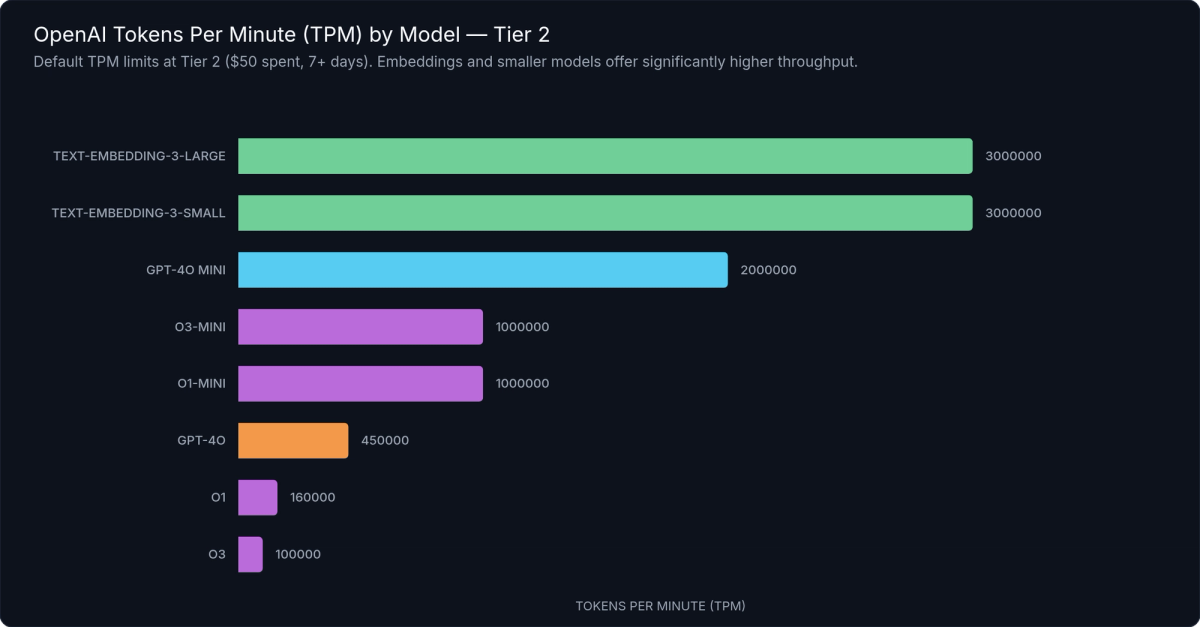
Figure 1: Tokens Per Minute (TPM) limits by model at Tier 2 — GPT-4o mini allows dramatically higher throughput than GPT-4o, while embedding models support the highest TPM ceilings of all.
Choosing the Right Model for Throughput
The choice between GPT-4o and GPT-4o mini is not just a cost and capability decision — it's a throughput decision. At Tier 1, GPT-4o mini allows roughly 10× the TPM of GPT-4o. If your application is hitting GPT-4o TPM limits but doesn't strictly require GPT-4o's capabilities for every request, routing some traffic to GPT-4o mini can unlock significant throughput without a tier upgrade or a limit increase request.
Section 5 provides a concrete model routing decision framework.
---
Understanding the 429 Rate Limit Error
When you exceed a rate limit, the OpenAI API returns an HTTP 429 status code. Understanding what the 429 response contains — and specifically which limit you hit — is the first step to fixing the problem correctly.
The 429 Response Structure
A rate limit error response from the OpenAI API looks like this:
{
  "error": {
    "message": "Rate limit reached for gpt-4o in organization org-abc123 on tokens per min (TPM): Limit 30000, Used 28500, Requested 5000. Please try again in 3s.",
    "type": "rate_limit_exceeded",
    "param": null,
    "code": "rate_limit_exceeded"
  }
}
The message field is the most actionable part. OpenAI includes the specific limit dimension that was exceeded (tokens per min in this example), your configured limit, your current usage, the tokens requested by the failed call, and the suggested wait time. Read this message carefully before implementing a fix — it tells you exactly which dimension you're bumping against.
Two Types of 429: Rate Limit vs. Quota
The error.type field distinguishes two fundamentally different problems that both surface as 429 errors:
`rate_limit_exceeded` means you've exceeded your RPM, TPM, RPD, or TPD limit. The fix is backoff and retry — the limit resets as the rolling window advances. This is the common case for production applications under load, and it's entirely recoverable without any account changes.
`insufficient_quota` means your organization has hit its billing usage cap, not a rate limit. Your account has spent up to the maximum configured in your billing settings. The fix is a billing change — increase your usage cap or add credits — not a retry. Retrying indefinitely on an insufficient_quota error will never succeed and will only waste time. This error is often confused with a rate limit error because it uses the same HTTP status code; always inspect error.type before implementing retry logic.
For more detail on OpenAI error types, see our OpenAI API error codes reference.
The Retry-After Header
When OpenAI includes a Retry-After header in the 429 response, it specifies the exact number of seconds to wait before retrying. Honor this value when it's present — it's the authoritative signal. When it's absent (which is common for token-based limits), use the suggested wait time from the error message or implement exponential backoff.
Catching and Inspecting 429 Errors in Code
# catch-429-python.py
import openai

client = openai.OpenAI()


def call_with_error_handling(prompt: str) -> str | None:
    """
    Call the OpenAI chat completions API with proper 429 error handling.

    Distinguishes between:
      - rate_limit_exceeded: transient; retry with backoff
      - insufficient_quota: billing cap hit; requires operator action, do NOT retry
    """
    try:
        response = client.chat.completions.create(
            model="gpt-4o",
            messages=[{"role": "user", "content": prompt}],
        )
        return response.choices[0].message.content

    except openai.RateLimitError as e:
        # Inspect the error code to distinguish the two 429 subtypes
        error_code = (e.body or {}).get("code", "")

        if error_code == "insufficient_quota":
            # Billing usage cap reached — retrying will NEVER succeed.
            # Surface to the operator; a billing change is required.
            raise RuntimeError(
                "OpenAI billing quota exhausted. Increase your usage cap at "
                "platform.openai.com/account/billing/limits."
            ) from e

        # rate_limit_exceeded — transient condition; safe to retry with backoff.
        # Honour the Retry-After header when present.
        retry_after = e.response.headers.get("Retry-After") if e.response else None
        wait_seconds = int(retry_after) if retry_after else 60
        print(
            f"Rate limit hit ({error_code}). "
            f"Suggested wait: {wait_seconds}s. "
            f"Message: {e.message}"
        )
        raise  # Re-raise so the calling retry loop can handle it

    except openai.APIConnectionError as e:
        print(f"Network connection error: {e}")
        raise
// catch-429-js.js
import OpenAI from "openai";
const client = new OpenAI();
/**
* Call the OpenAI chat completions API with proper 429 error handling.
*
* Distinguishes between:
* - rate_limit_exceeded : transient; retry with backoff
* - insufficient_quota : billing cap hit; requires operator action, do NOT retry
*/
async function callWithErrorHandling(prompt) {
try {
const response = await client.chat.completions.create({
model: "gpt-4o",
messages: [{ role: "user", content: prompt }],
});
return response.choices[0].message.content;
} catch (err) {
if (err instanceof OpenAI.RateLimitError) {
const errorCode = err.error?.code;
if (errorCode === "insufficient_quota") {
// Billing usage cap reached — retrying will NEVER succeed.
throw new Error(
"OpenAI billing quota exhausted. Increase your usage cap at " +
"platform.openai.com/account/billing/limits."
);
}
// rate_limit_exceeded — transient; safe to retry with backoff.
const retryAfter = err.headers?.["retry-after"];
const waitSeconds = retryAfter ? parseInt(retryAfter, 10) : 60;
console.warn(
`Rate limit hit (${errorCode}). Suggested wait: ${waitSeconds}s.`
);
throw err; // Re-raise for the calling retry loop to handle
}
if (err instanceof OpenAI.APIConnectionError) {
console.error(`Network connection error: ${err.message}`);
throw err;
}
throw err;
}
}The code examples above show how to catch rate limit errors using the official Python and Node.js SDKs, inspect the error type, and branch correctly between rate_limit_exceeded (retry with backoff) and insufficient_quota (surface to the operator). Always handle these two cases differently — one is a transient condition, the other requires human intervention.
---
How to Handle OpenAI Rate Limits in Production
Building a resilient OpenAI integration means proactively managing rate limits, not just reacting to 429 errors. Four strategies cover the core problem space:
- Implement exponential backoff with jitter for automatic retries
- Add client-side rate limiting to proactively stay under limits
- Batch small requests together to reduce RPM usage
- Route lower-stakes tasks to higher-limit models (GPT-4o mini)
Strategy 1: Exponential Backoff with Jitter
Exponential backoff is the non-negotiable baseline for any production integration. The principle: when a request fails with a retriable error (429, 503, or 502), wait before retrying, and double the wait time on each subsequent failure up to a maximum.
Without jitter, all your workers retry at exactly the same time after a shared failure event, creating a "thundering herd" that hits the limit again immediately. Adding a random offset (jitter) spreads retries across a window, dramatically reducing synchronized collisions and the probability of cascading failures.
The tenacity library provides a clean, decorator-based Python implementation that handles all the timing logic for you:
# exponential-backoff-python.py
import openai
from tenacity import (
    retry,
    stop_after_attempt,
    wait_exponential_jitter,
    retry_if_exception_type,
)

client = openai.OpenAI()


@retry(
    # Only retry on RateLimitError (not billing errors, not auth errors)
    retry=retry_if_exception_type(openai.RateLimitError),
    # Exponential backoff: starts at ~1s, doubles each attempt, capped at 60s
    # Jitter of ±10s is added to each wait to prevent thundering-herd collisions
    wait=wait_exponential_jitter(initial=1, max=60, jitter=10),
    # Give up after 6 attempts (covers ~1 + 2 + 4 + 8 + 16 + 32 = ~63s of wait)
    stop=stop_after_attempt(6),
    # Raise the original exception on final failure (not a RetryError wrapper)
    reraise=True,
)
def call_with_backoff(prompt: str, model: str = "gpt-4o") -> str:
    """
    Call the OpenAI API with automatic exponential backoff on rate limit errors.

    Retry schedule (approximate, before jitter):
        Attempt 1 — immediate
        Attempt 2 — wait ~1s
        Attempt 3 — wait ~2s
        Attempt 4 — wait ~4s
        Attempt 5 — wait ~8s
        Attempt 6 — wait ~16s (final attempt)
    """
    response = client.chat.completions.create(
        model=model,
        messages=[{"role": "user", "content": prompt}],
    )
    return response.choices[0].message.content
The Python example uses tenacity's @retry decorator with wait_exponential_jitter — exponential backoff with automatic random jitter — and retry_if_exception_type scoped to rate limit errors only. This is important: you don't want to retry on billing errors (insufficient_quota), invalid request errors, or authentication errors. For JavaScript and TypeScript applications, a vanilla implementation without external dependencies is straightforward:
// exponential-backoff-js.js
import OpenAI from "openai";

const client = new OpenAI();

function sleep(ms) {
  return new Promise((resolve) => setTimeout(resolve, ms));
}

/**
 * Call the OpenAI API with exponential backoff and full jitter.
 * Does NOT retry on insufficient_quota (billing) errors.
 *
 * @param {string} prompt
 * @param {object} [options]
 * @param {string}  [options.model="gpt-4o"]
 * @param {number}  [options.maxRetries=6]
 * @param {number}  [options.baseDelayMs=1000]
 * @param {number}  [options.maxDelayMs=60000]
 */
async function callWithBackoff(
  prompt,
  { model = "gpt-4o", maxRetries = 6, baseDelayMs = 1_000, maxDelayMs = 60_000 } = {}
) {
  let attempt = 0;

  while (true) {
    try {
      const response = await client.chat.completions.create({
        model,
        messages: [{ role: "user", content: prompt }],
      });
      return response.choices[0].message.content;
    } catch (err) {
      const isRateLimit = err instanceof OpenAI.RateLimitError;
      const isBillingError = err.error?.code === "insufficient_quota";

      if (!isRateLimit || isBillingError || attempt >= maxRetries) {
        throw err;
      }

      // Full jitter: wait = random value in [0, min(baseDelay * 2^attempt, maxDelay)]
      const cap = Math.min(baseDelayMs * 2 ** attempt, maxDelayMs);
      const delay = Math.floor(Math.random() * cap);

      console.warn(
        `Rate limit hit (attempt ${attempt + 1}/${maxRetries}). ` +
          `Retrying in ${delay}ms.`
      );
      await sleep(delay);
      attempt++;
    }
  }
}
Both examples cap the maximum retry count and maximum wait time to prevent infinite retry loops during sustained rate pressure.
Strategy 2: Token-Aware Request Batching
Every API call consumes at least one RPM unit, regardless of how small the prompt is. Applications that send many tiny requests hit RPM limits faster than necessary. Batching multiple pieces of work into a single request reduces RPM consumption proportionally, at the cost of slightly higher latency per individual result.
The binding constraint on batch size is TPM — a batch of requests must fit within your per-request context window. Python's tiktoken library (the same tokenizer OpenAI uses internally) lets you count tokens before sending, enabling precise packing:
import tiktoken

encoder = tiktoken.encoding_for_model("gpt-4o")

def count_tokens(text: str) -> int:
    return len(encoder.encode(text))
Use token counting to pack batches to a safe fraction of your context window (e.g., 80%), leaving headroom for response tokens and concurrent requests. See the tiktoken guide for complete token estimation patterns including chat message overhead.
For the embeddings API specifically, you can pass multiple input strings in a single request — this is the most efficient batching mechanism available for embedding workloads, with no additional complexity required.
Strategy 3: Client-Side Rate Limiting
Rather than waiting for a 429 to trigger a retry, client-side rate limiting keeps your request rate proactively below the limit. This eliminates the latency cost of failed requests and their retries, at the cost of slightly lower peak throughput.
The token bucket pattern maintains a virtual "bucket" that refills at your allowed RPM rate. Each request draws from the bucket; if the bucket is empty, the request waits. Python's asyncio provides a lightweight async implementation suitable for single-process applications:
# async-rate-limiter-python.py
import asyncio
import time
import openai

client = openai.AsyncOpenAI()


class AsyncRateLimiter:
    """
    Async token-bucket rate limiter for the OpenAI API.

    Tracks requests per minute (RPM) and tokens per minute (TPM) using
    rolling 60-second windows — matching OpenAI's own window behaviour.
    """

    def __init__(self, rpm: int, tpm: int) -> None:
        self.rpm = rpm
        self.tpm = tpm
        self._lock = asyncio.Lock()
        # Each entry is (timestamp, token_count)
        self._window: list[tuple[float, int]] = []

    async def acquire(self, estimated_tokens: int = 1_000) -> None:
        """Block until both RPM and TPM headroom is available."""
        async with self._lock:
            while True:
                now = time.monotonic()
                self._window = [(t, tok) for t, tok in self._window if now - t < 60]

                current_rpm = len(self._window)
                current_tpm = sum(tok for _, tok in self._window)

                if current_rpm < self.rpm and (current_tpm + estimated_tokens) <= self.tpm:
                    self._window.append((now, estimated_tokens))
                    return

                wait_secs = 60.0 - (now - self._window[0][0]) + 0.05 if self._window else 1.0
                self._lock.release()
                await asyncio.sleep(wait_secs)
                await self._lock.acquire()


# Stay 10% under Tier 1 GPT-4o defaults (500 RPM, 30,000 TPM)
limiter = AsyncRateLimiter(rpm=450, tpm=27_000)


async def process_item(prompt: str) -> str:
    estimated_tokens = int(len(prompt.split()) * 1.4)
    await limiter.acquire(estimated_tokens)
    response = await client.chat.completions.create(
        model="gpt-4o",
        messages=[{"role": "user", "content": prompt}],
    )
    return response.choices[0].message.content
For production systems running multiple worker processes or Kubernetes pods, coordinate rate limiting via a shared Redis instance. A Redis-based token bucket ensures your distributed workers collectively stay under the limit. Task queue solutions like Celery, RQ, or BullMQ also provide durable queuing with configurable rate limiting built in.
Strategy 4: Model Routing
Model routing is the throughput lever most developers overlook. Because GPT-4o and GPT-4o mini have separate, independent rate limit pools, routing traffic to GPT-4o mini doesn't consume your GPT-4o quota at all. It's a true throughput multiplier.
A practical routing decision framework:
| Task Type | Recommended Model | Rationale |
|---|---|---|
| Customer-facing responses requiring high capability | GPT-4o | Quality matters; throughput secondary |
| Classification, tagging, structured extraction | GPT-4o mini | Well within GPT-4o mini capability; much higher limits |
| Summarization of short documents | GPT-4o mini | Sufficient quality; 10× higher throughput |
| Summarization of long or complex documents | GPT-4o | Context handling and accuracy matter |
| Bulk embedding generation | text-embedding-3-small / large | Separate pool; purpose-built for the task |
| Complex reasoning tasks | o3-mini or o1 | Reasoning model; separate pool entirely |
The goal is to preserve your GPT-4o budget for tasks where it provides meaningful differentiation, and route everything else to higher-limit alternatives.
---
The Batch API: Your Escape Hatch for High-Volume Workloads
Not every workload needs a real-time response. Data pipelines, bulk classification jobs, offline embedding generation, model evaluations, and nightly processing runs are all async by nature — they can tolerate latency in exchange for higher throughput and lower cost. For these use cases, OpenAI's Batch API is the right tool.
What Makes the Batch API Different
The Batch API processes requests asynchronously with a 24-hour completion SLA. You submit a file of requests, OpenAI processes them, and you retrieve the results file when complete. Two key advantages make this distinct from simply sending slower synchronous requests:
Separate rate limit pool. Batch API requests don't consume your synchronous RPM or TPM quota at all. Batch quota is measured in enqueued tokens with its own per-tier ceiling. Running large batch jobs overnight doesn't compete with your daytime real-time API traffic — the two pools are completely independent.
50% cost reduction. All requests processed through the Batch API are billed at half the standard price for the same model. For high-volume async workloads, this is a significant savings that compounds at scale.
When to Use Batch API vs. Synchronous API
Good fits for Batch API:
- Bulk document classification or entity extraction
- Generating embeddings for a large document corpus
- Running model evaluations across a test set
- Processing a backlog of user-uploaded content
- Nightly data enrichment pipelines
Not suitable for Batch API:
- Real-time, user-facing chat or completion responses
- Any workflow where results are needed within minutes
- Latency-sensitive inference pipelines
Eligible Endpoints and Submitting a Job
The Batch API supports three endpoints: /v1/chat/completions, /v1/embeddings, and /v1/completions. The same models available via synchronous API are available in batch mode.
# batch-api-submit-python.py
import json
import time
import openai

client = openai.OpenAI()


def submit_batch_job(requests: list[dict], model: str = "gpt-4o-mini") -> str:
    """
    Submit a list of chat completion requests to the OpenAI Batch API.

    Each item in `requests` should be a dict with:
        custom_id (str)  — unique identifier; echoed back in results
        prompt    (str)  — the user message text

    Advantages: separate rate limit pool + 50% cost discount.
    Trade-off: up to 24-hour completion window.
    """
    # 1. Build a JSONL file — one JSON object per line
    jsonl_lines = [
        json.dumps({
            "custom_id": req["custom_id"],
            "method": "POST",
            "url": "/v1/chat/completions",
            "body": {
                "model": req.get("model", model),
                "messages": [{"role": "user", "content": req["prompt"]}],
                "max_tokens": req.get("max_tokens", 1_024),
            },
        })
        for req in requests
    ]
    jsonl_bytes = "\n".join(jsonl_lines).encode("utf-8")

    # 2. Upload the JSONL file via the Files API
    upload = client.files.create(
        file=("batch_requests.jsonl", jsonl_bytes, "application/jsonl"),
        purpose="batch",
    )

    # 3. Submit the batch job
    batch = client.batches.create(
        input_file_id=upload.id,
        endpoint="/v1/chat/completions",
        completion_window="24h",
    )
    print(f"Batch job created: {batch.id} | Status: {batch.status}")
    return batch.id


def retrieve_batch_results(batch_id: str) -> list[dict]:
    """Poll until complete, then download and return results."""
    while True:
        batch = client.batches.retrieve(batch_id)
        if batch.status == "completed":
            break
        if batch.status in ("failed", "expired", "cancelled"):
            raise RuntimeError(f"Batch ended with status: {batch.status}")
        time.sleep(30)

    output_text = client.files.content(batch.output_file_id).text
    return [
        {
            "custom_id": row["custom_id"],
            "content": row["response"]["body"]["choices"][0]["message"]["content"],
        }
        for row in (json.loads(line) for line in output_text.strip().split("\n"))
    ]
The workflow is: create a JSONL file with your requests, upload it via the Files API, submit a batch job referencing the file ID, poll for completion, and download the results file. The code example above shows the complete flow in Python using the official SDK.
For a full deep-dive into the Batch API workflow, error handling, and cost optimization, see our OpenAI Batch API guide.
---
How to Request a Rate Limit Increase
Automatic tier advancement handles the rate limit needs of most applications. But if you're on Tier 5 and your production workload consistently exceeds your default limits, OpenAI provides a manual increase request process.
Prerequisites
You must be on Tier 5 before you can submit a manual increase request. If you're on a lower tier, the correct path forward is to spend toward the next tier threshold — manual increase requests aren't available for Tier 1 through Tier 4.
One exception: funded startups with OpenAI API credits may qualify for elevated starting limits before reaching Tier 5. Contact OpenAI support to explore this if it applies to your situation.
Step-by-Step Process
- Navigate to platform.openai.com → Settings → Limits. This page shows your current limits for every model and every rate limit dimension in one place.
- Click "Request increase" next to the specific model and limit type you need raised — for example, GPT-4o TPM.
- Complete the request form. Key fields include:
- Your use case description - Expected monthly token volume (be specific with numbers) - Application type (customer-facing product, internal tool, API service, etc.) - Why your current limit is a business constraint
- Submit and wait. OpenAI typically responds within 3–10 business days. You'll receive an email notification when your request is reviewed.
What Makes a Strong Request
Increase requests are evaluated on justification quality. Approved requests tend to share these traits:
- Specific volume numbers. "We process approximately 50 million tokens per day across 200,000 user sessions" is far stronger than "we process a lot of requests." Give the reviewer numbers they can evaluate.
- Concrete user impact. Explain what breaks or degrades when you hit the limit. "Users experience failed API responses during peak hours between 14:00–17:00 UTC" is concrete and credible.
- Business context. "We're onboarding an enterprise customer in Q2 that will triple our daily volume" provides forward-looking justification that generic requests lack.
Vague requests ("we need higher limits for our AI application") are less likely to be approved — or may receive smaller increases than requested.
The Enterprise Path
If your organization has significant spend commitments or is evaluating OpenAI at enterprise scale, contacting OpenAI's sales team directly opens a negotiated limits path that operates outside the standard tier structure. This route is available for customers whose requirements exceed what the standard increase request process can accommodate.
---
Frequently Asked Questions About OpenAI Rate Limits
Do OpenAI rate limits reset every minute or at a fixed time?
Rate limits use rolling windows, not fixed resets. For RPM and TPM, the window is a rolling 60 seconds — not the top of the clock minute. For RPD and TPD, it's a rolling 24 hours, not a midnight reset. Limit availability is continuous and depends on when your previous requests were made, not on a fixed schedule. There is no "wait until midnight" shortcut.
Are rate limits per API key or per organization?
Rate limits are per organization. All API keys created under the same OpenAI organization share the same RPM, TPM, RPD, and TPD pools. Creating additional API keys does not increase your limits. If multiple team members or services share an organization, all their usage counts against the same shared quota.
Do rate limits apply to all models together or separately per model?
Limits apply per model. GPT-4o, GPT-4o mini, o1, and text-embedding-3-large each have their own independent rate limit pools. Using GPT-4o mini does not consume your GPT-4o quota. This per-model separation is precisely why model routing (Section 5) is an effective throughput strategy — you can fully utilize multiple pools simultaneously.
What happens when multiple team members use the same organization's API keys?
All usage across the organization counts toward the shared quota. There is no per-user sub-quota within an organization. For high-volume teams, this means you need to coordinate usage at the application level — use client-side rate limiting (Section 5) to ensure critical workloads aren't starved by background jobs running under different API keys.
Can I get higher rate limits without reaching $1,000 in spend?
Not through automatic tier advancement — the Tier 5 threshold requires $1,000 cumulative spend plus 30 days of account age. However, funded startups with OpenAI API credits may qualify for elevated starting tiers; reach out to OpenAI support to explore this. Some developer programs and research partnerships also come with elevated limits — check OpenAI's startup and research programs for eligibility.
Do streaming responses count the same as regular API requests?
Yes. Streaming uses the same RPM and TPM pools as non-streaming requests. The response is delivered token-by-token in real time, but the full token count — both prompt tokens and completion tokens — is consumed against your TPM limit when the request completes. Streaming does not consume TPM incrementally as tokens arrive, nor does it provide any rate limit advantage over non-streaming requests.
Are embeddings and chat completions rate limited separately?
Yes. Each model has its own independent rate limit pool. Requests to text-embedding-3-large don't consume your GPT-4o quota, and vice versa. Embeddings models also typically have higher TPM ceilings than chat models, making them well-suited for bulk processing workflows that would quickly exhaust chat model limits.
---
What to Do Now
OpenAI rate limits follow a learnable, structured system. Once you understand the four dimensions, the tier structure, and the practical mitigation strategies, you go from reacting to 429 errors to designing around them from the start.
The key takeaways from this guide:
- Four independent dimensions. RPM, TPM, RPD, and TPD are each enforced separately. Exceeding any one triggers a 429. Account for all four in your architecture — you can hit TPM with wide RPM headroom remaining.
- Tiers advance automatically. Spend toward the next threshold — no ticket required until Tier 5. Check your current tier and limits at platform.openai.com → Settings → Limits.
- Implement exponential backoff with jitter from day one. Don't ship a production integration without retry logic. It's the difference between a momentary blip and a user-facing outage.
- Use Batch API for async workloads. Separate quota pool, 50% cost discount. There's no reason to use the synchronous API for nightly jobs, offline pipelines, or bulk evaluation runs.
Your next three steps:
- Check your current limits now at platform.openai.com → Settings → Limits — know your exact headroom across each model and dimension.
- Add exponential backoff with jitter to any integration that doesn't already have it. Use the patterns from Section 5 as a starting point.
- Audit your workloads for async use cases that could move to Batch API and unlock both a separate quota pool and a 50% cost reduction.
If you're approaching Tier 5 and anticipating higher volume, start drafting your increase request now with specific volume numbers. The more concrete your justification, the stronger your request.
---
References
- OpenAI. Rate Limits. platform.openai.com/docs/guides/rate-limits. Retrieved March 2026.
- OpenAI. Batch API. platform.openai.com/docs/guides/batch. Retrieved March 2026.
- OpenAI. API Error Codes. platform.openai.com/docs/guides/error-codes. Retrieved March 2026.
- OpenAI. Settings → Limits. platform.openai.com (authenticated). Retrieved March 2026.
- OpenAI Python SDK. openai-python. github.com/openai/openai-python. Retrieved March 2026.
- OpenAI Node.js SDK. openai-node. github.com/openai/openai-node. Retrieved March 2026.
- tenacity library. tenacity.readthedocs.io. Retrieved March 2026.
- tiktoken library. github.com/openai/tiktoken. Retrieved March 2026.
Meet with our research team
Schedule a call with our research team to learn more Specialized Language Models can cut costs and improve performance.