'%3e%3crect%20x='2'%20y='1.64014'%20width='48'%20height='48'%20rx='24'%20fill='%23292929'/%3e%3crect%20x='2.625'%20y='2.26514'%20width='46.75'%20height='46.75'%20rx='23.375'%20stroke='%23636363'%20stroke-width='1.25'/%3e%3cpath%20d='M22.6665%2025.6402L24.8887%2027.8624L29.8887%2022.8624M20.8151%2016.5498C21.7082%2016.4786%2022.5561%2016.1273%2023.2381%2015.5462C24.8295%2014.19%2027.1701%2014.19%2028.7615%2015.5462C29.4434%2016.1273%2030.2913%2016.4786%2031.1845%2016.5498C33.2687%2016.7162%2034.9238%2018.3712%2035.0901%2020.4555C35.1614%2021.3486%2035.5126%2022.1965%2036.0938%2022.8785C37.4499%2024.4699%2037.4499%2026.8105%2036.0938%2028.4019C35.5126%2029.0838%2035.1614%2029.9317%2035.0901%2030.8249C34.9238%2032.9091%2033.2687%2034.5642%2031.1845%2034.7305C30.2913%2034.8018%2029.4434%2035.153%2028.7615%2035.7341C27.1701%2037.0903%2024.8295%2037.0903%2023.2381%2035.7341C22.5561%2035.153%2021.7082%2034.8018%2020.8151%2034.7305C18.7308%2034.5642%2017.0758%2032.9091%2016.9094%2030.8249C16.8382%2029.9317%2016.487%2029.0838%2015.9058%2028.4019C14.5496%2026.8105%2014.5496%2024.4699%2015.9058%2022.8785C16.487%2022.1965%2016.8382%2021.3486%2016.9094%2020.4555C17.0758%2018.3712%2018.7308%2016.7161%2020.8151%2016.5498Z'%20stroke='%23E7E7E7'%20stroke-width='1.125'%20stroke-linecap='round'%20stroke-linejoin='round'/%3e%3c/g%3e%3cdefs%3e%3cfilter%20id='filter0_d_411_10857'%20x='0.5'%20y='0.140137'%20width='51'%20height='51'%20filterUnits='userSpaceOnUse'%20color-interpolation-filters='sRGB'%3e%3cfeFlood%20flood-opacity='0'%20result='BackgroundImageFix'/%3e%3cfeColorMatrix%20in='SourceAlpha'%20type='matrix'%20values='0%200%200%200%200%200%200%200%200%200%200%200%200%200%200%200%200%200%20127%200'%20result='hardAlpha'/%3e%3cfeMorphology%20radius='1.5'%20operator='dilate'%20in='SourceAlpha'%20result='effect1_dropShadow_411_10857'/%3e%3cfeOffset/%3e%3cfeComposite%20in2='hardAlpha'%20operator='out'/%3e%3cfeColorMatrix%20type='matrix'%20values='0%200%200%200%200.08%200%200%200%200%200.08%200%200%200%200%200.08%200%200%200%201%200'/%3e%3cfeBlend%20mode='normal'%20in2='BackgroundImageFix'%20result='effect1_dropShadow_411_10857'/%3e%3cfeBlend%20mode='normal'%20in='SourceGraphic'%20in2='effect1_dropShadow_411_10857'%20result='shape'/%3e%3c/filter%3e%3c/defs%3e%3c/svg%3e)
'%3e%3crect%20x='2'%20y='1.64014'%20width='48'%20height='48'%20rx='24'%20fill='%23292929'/%3e%3crect%20x='2.625'%20y='2.26514'%20width='46.75'%20height='46.75'%20rx='23.375'%20stroke='%23636363'%20stroke-width='1.25'/%3e%3cpath%20d='M21.5556%2015.6401H19.5556C18.311%2015.6401%2017.6887%2015.6401%2017.2134%2015.8823C16.7952%2016.0954%2016.4553%2016.4354%2016.2422%2016.8535C16%2017.3289%2016%2017.9511%2016%2019.1957V21.1957M21.5556%2035.6401H19.5556C18.311%2035.6401%2017.6887%2035.6401%2017.2134%2035.3979C16.7952%2035.1849%2016.4553%2034.8449%2016.2422%2034.4268C16%2033.9514%2016%2033.3291%2016%2032.0846V30.0846M36%2021.1957V19.1957C36%2017.9511%2036%2017.3289%2035.7578%2016.8535C35.5447%2016.4354%2035.2048%2016.0954%2034.7866%2015.8823C34.3113%2015.6401%2033.689%2015.6401%2032.4444%2015.6401H30.4444M36%2030.0846V32.0846C36%2033.3291%2036%2033.9514%2035.7578%2034.4268C35.5447%2034.8449%2035.2048%2035.1849%2034.7866%2035.3979C34.3113%2035.6401%2033.689%2035.6401%2032.4444%2035.6401H30.4444M30.4444%2025.6401C30.4444%2028.0947%2028.4546%2030.0846%2026%2030.0846C23.5454%2030.0846%2021.5556%2028.0947%2021.5556%2025.6401C21.5556%2023.1855%2023.5454%2021.1957%2026%2021.1957C28.4546%2021.1957%2030.4444%2023.1855%2030.4444%2025.6401Z'%20stroke='%23E7E7E7'%20stroke-width='1.125'%20stroke-linecap='round'%20stroke-linejoin='round'/%3e%3c/g%3e%3cdefs%3e%3cfilter%20id='filter0_d_1154_2040'%20x='0.5'%20y='0.140137'%20width='51'%20height='51'%20filterUnits='userSpaceOnUse'%20color-interpolation-filters='sRGB'%3e%3cfeFlood%20flood-opacity='0'%20result='BackgroundImageFix'/%3e%3cfeColorMatrix%20in='SourceAlpha'%20type='matrix'%20values='0%200%200%200%200%200%200%200%200%200%200%200%200%200%200%200%200%200%20127%200'%20result='hardAlpha'/%3e%3cfeMorphology%20radius='1.5'%20operator='dilate'%20in='SourceAlpha'%20result='effect1_dropShadow_1154_2040'/%3e%3cfeOffset/%3e%3cfeComposite%20in2='hardAlpha'%20operator='out'/%3e%3cfeColorMatrix%20type='matrix'%20values='0%200%200%200%200.08%200%200%200%200%200.08%200%200%200%200%200.08%200%200%200%201%200'/%3e%3cfeBlend%20mode='normal'%20in2='BackgroundImageFix'%20result='effect1_dropShadow_1154_2040'/%3e%3cfeBlend%20mode='normal'%20in='SourceGraphic'%20in2='effect1_dropShadow_1154_2040'%20result='shape'/%3e%3c/filter%3e%3c/defs%3e%3c/svg%3e)
'%3e%3crect%20x='2'%20y='1.64014'%20width='48'%20height='48'%20rx='24'%20fill='%23292929'/%3e%3crect%20x='2.625'%20y='2.26514'%20width='46.75'%20height='46.75'%20rx='23.375'%20stroke='%23636363'%20stroke-width='1.25'/%3e%3cpath%20d='M23.7778%2031.9275V34.5291C23.7778%2035.7564%2024.7727%2036.7513%2026%2036.7513C27.2273%2036.7513%2028.2222%2035.7564%2028.2222%2034.5291V31.9275M26%2014.5291V15.6402M16%2025.6402H14.8889M18.7778%2018.4179L18.111%2017.7512M33.2222%2018.4179L33.8892%2017.7512M37.1111%2025.6402H36M32.6667%2025.6402C32.6667%2029.3221%2029.6819%2032.3068%2026%2032.3068C22.3181%2032.3068%2019.3333%2029.3221%2019.3333%2025.6402C19.3333%2021.9583%2022.3181%2018.9735%2026%2018.9735C29.6819%2018.9735%2032.6667%2021.9583%2032.6667%2025.6402Z'%20stroke='%23E7E7E7'%20stroke-width='1.125'%20stroke-linecap='round'%20stroke-linejoin='round'/%3e%3c/g%3e%3cdefs%3e%3cfilter%20id='filter0_d_1117_17437'%20x='0.5'%20y='0.140137'%20width='51'%20height='51'%20filterUnits='userSpaceOnUse'%20color-interpolation-filters='sRGB'%3e%3cfeFlood%20flood-opacity='0'%20result='BackgroundImageFix'/%3e%3cfeColorMatrix%20in='SourceAlpha'%20type='matrix'%20values='0%200%200%200%200%200%200%200%200%200%200%200%200%200%200%200%200%200%20127%200'%20result='hardAlpha'/%3e%3cfeMorphology%20radius='1.5'%20operator='dilate'%20in='SourceAlpha'%20result='effect1_dropShadow_1117_17437'/%3e%3cfeOffset/%3e%3cfeComposite%20in2='hardAlpha'%20operator='out'/%3e%3cfeColorMatrix%20type='matrix'%20values='0%200%200%200%200.08%200%200%200%200%200.08%200%200%200%200%200.08%200%200%200%201%200'/%3e%3cfeBlend%20mode='normal'%20in2='BackgroundImageFix'%20result='effect1_dropShadow_1117_17437'/%3e%3cfeBlend%20mode='normal'%20in='SourceGraphic'%20in2='effect1_dropShadow_1117_17437'%20result='shape'/%3e%3c/filter%3e%3c/defs%3e%3c/svg%3e)
'%3e%3crect%20x='2.33301'%20y='2'%20width='48'%20height='48'%20rx='24'%20fill='%23292929'/%3e%3crect%20x='2.95801'%20y='2.625'%20width='46.75'%20height='46.75'%20rx='23.375'%20stroke='%23636363'%20stroke-width='1.25'/%3e%3cpath%20d='M18.5557%2022.6665H34.1112M18.5557%2029.3332H34.1112'%20stroke='%23E7E7E7'%20stroke-width='1.125'%20stroke-linecap='round'%20stroke-linejoin='round'/%3e%3c/g%3e%3cdefs%3e%3cfilter%20id='filter0_d_1851_59239'%20x='0.833008'%20y='0.5'%20width='51'%20height='51'%20filterUnits='userSpaceOnUse'%20color-interpolation-filters='sRGB'%3e%3cfeFlood%20flood-opacity='0'%20result='BackgroundImageFix'/%3e%3cfeColorMatrix%20in='SourceAlpha'%20type='matrix'%20values='0%200%200%200%200%200%200%200%200%200%200%200%200%200%200%200%200%200%20127%200'%20result='hardAlpha'/%3e%3cfeMorphology%20radius='1.5'%20operator='dilate'%20in='SourceAlpha'%20result='effect1_dropShadow_1851_59239'/%3e%3cfeOffset/%3e%3cfeComposite%20in2='hardAlpha'%20operator='out'/%3e%3cfeColorMatrix%20type='matrix'%20values='0%200%200%200%200.08%200%200%200%200%200.08%200%200%200%200%200.08%200%200%200%201%200'/%3e%3cfeBlend%20mode='normal'%20in2='BackgroundImageFix'%20result='effect1_dropShadow_1851_59239'/%3e%3cfeBlend%20mode='normal'%20in='SourceGraphic'%20in2='effect1_dropShadow_1851_59239'%20result='shape'/%3e%3c/filter%3e%3c/defs%3e%3c/svg%3e)
'%3e%3crect%20x='2'%20y='2.14014'%20width='48'%20height='48'%20rx='24'%20fill='%23292929'/%3e%3crect%20x='2.625'%20y='2.76514'%20width='46.75'%20height='46.75'%20rx='23.375'%20stroke='%23636363'%20stroke-width='1.25'/%3e%3cpath%20d='M22.6667%2015.0288V17.251M29.3333%2015.0288V17.251M22.6667%2035.0288V37.251M29.3333%2035.0288V37.251M34.8889%2022.8066H37.1111M34.8889%2028.3621H37.1111M14.8889%2022.8066H17.1111M14.8889%2028.3621H17.1111M22.4444%2035.0288H29.5556C31.4224%2035.0288%2032.3558%2035.0288%2033.0689%2034.6655C33.6961%2034.3459%2034.206%2033.836%2034.5256%2033.2088C34.8889%2032.4957%2034.8889%2031.5623%2034.8889%2029.6955V22.5844C34.8889%2020.7175%2034.8889%2019.7841%2034.5256%2019.0711C34.206%2018.4439%2033.6961%2017.9339%2033.0689%2017.6143C32.3558%2017.251%2031.4224%2017.251%2029.5556%2017.251H22.4444C20.5776%2017.251%2019.6442%2017.251%2018.9311%2017.6143C18.3039%2017.9339%2017.794%2018.4439%2017.4744%2019.0711C17.1111%2019.7841%2017.1111%2020.7175%2017.1111%2022.5844V29.6955C17.1111%2031.5623%2017.1111%2032.4957%2017.4744%2033.2088C17.794%2033.836%2018.3039%2034.3459%2018.9311%2034.6655C19.6442%2035.0288%2020.5776%2035.0288%2022.4444%2035.0288ZM24.4444%2029.4733H27.5556C28.1778%2029.4733%2028.489%2029.4733%2028.7267%2029.3522C28.9357%2029.2456%2029.1057%2029.0756%2029.2122%2028.8666C29.3333%2028.6289%2029.3333%2028.3178%2029.3333%2027.6955V24.5844C29.3333%2023.9621%2029.3333%2023.6509%2029.2122%2023.4133C29.1057%2023.2042%2028.9357%2023.0342%2028.7267%2022.9277C28.489%2022.8066%2028.1778%2022.8066%2027.5556%2022.8066H24.4444C23.8222%2022.8066%2023.511%2022.8066%2023.2733%2022.9277C23.0643%2023.0342%2022.8943%2023.2042%2022.7878%2023.4133C22.6667%2023.6509%2022.6667%2023.9621%2022.6667%2024.5844V27.6955C22.6667%2028.3178%2022.6667%2028.6289%2022.7878%2028.8666C22.8943%2029.0756%2023.0643%2029.2456%2023.2733%2029.3522C23.511%2029.4733%2023.8222%2029.4733%2024.4444%2029.4733Z'%20stroke='%23E7E7E7'%20stroke-width='1.125'%20stroke-linecap='round'%20stroke-linejoin='round'/%3e%3c/g%3e%3cdefs%3e%3cfilter%20id='filter0_d_1117_10655'%20x='0.5'%20y='0.640137'%20width='51'%20height='51'%20filterUnits='userSpaceOnUse'%20color-interpolation-filters='sRGB'%3e%3cfeFlood%20flood-opacity='0'%20result='BackgroundImageFix'/%3e%3cfeColorMatrix%20in='SourceAlpha'%20type='matrix'%20values='0%200%200%200%200%200%200%200%200%200%200%200%200%200%200%200%200%200%20127%200'%20result='hardAlpha'/%3e%3cfeMorphology%20radius='1.5'%20operator='dilate'%20in='SourceAlpha'%20result='effect1_dropShadow_1117_10655'/%3e%3cfeOffset/%3e%3cfeComposite%20in2='hardAlpha'%20operator='out'/%3e%3cfeColorMatrix%20type='matrix'%20values='0%200%200%200%200.08%200%200%200%200%200.08%200%200%200%200%200.08%200%200%200%201%200'/%3e%3cfeBlend%20mode='normal'%20in2='BackgroundImageFix'%20result='effect1_dropShadow_1117_10655'/%3e%3cfeBlend%20mode='normal'%20in='SourceGraphic'%20in2='effect1_dropShadow_1117_10655'%20result='shape'/%3e%3c/filter%3e%3c/defs%3e%3c/svg%3e)

'%3e%3crect%20x='1.66699'%20y='2'%20width='48'%20height='48'%20rx='24'%20fill='%23292929'/%3e%3crect%20x='2.29199'%20y='2.625'%20width='46.75'%20height='46.75'%20rx='23.375'%20stroke='%23636363'%20stroke-width='1.25'/%3e%3cpath%20d='M35.667%2032.6667L34.5557%2033.8823C33.9664%2034.5269%2033.1672%2034.8889%2032.3338%2034.8889C31.5004%2034.8889%2030.7012%2034.5269%2030.1119%2033.8823C29.5217%2033.2391%2028.7225%2032.8779%2027.8894%2032.8779C27.0563%2032.8779%2026.2571%2033.2391%2025.667%2033.8823M15.667%2034.8889H17.5276C18.0711%2034.8889%2018.3429%2034.8889%2018.5986%2034.8275C18.8254%2034.7731%2019.0422%2034.6833%2019.241%2034.5615C19.4652%2034.424%2019.6574%2034.2319%2020.0418%2033.8475L34.0004%2019.8889C34.9208%2018.9684%2034.9208%2017.4761%2034.0004%2016.5556C33.0799%2015.6351%2031.5875%2015.6351%2030.667%2016.5556L16.7084%2030.5142C16.3241%2030.8985%2016.1319%2031.0907%2015.9945%2031.315C15.8726%2031.5138%2015.7828%2031.7306%2015.7284%2031.9573C15.667%2032.213%2015.667%2032.4848%2015.667%2033.0284V34.8889Z'%20stroke='%23E7E7E7'%20stroke-width='1.125'%20stroke-linecap='round'%20stroke-linejoin='round'/%3e%3c/g%3e%3cdefs%3e%3cfilter%20id='filter0_d_1851_59244'%20x='0.166992'%20y='0.5'%20width='51'%20height='51'%20filterUnits='userSpaceOnUse'%20color-interpolation-filters='sRGB'%3e%3cfeFlood%20flood-opacity='0'%20result='BackgroundImageFix'/%3e%3cfeColorMatrix%20in='SourceAlpha'%20type='matrix'%20values='0%200%200%200%200%200%200%200%200%200%200%200%200%200%200%200%200%200%20127%200'%20result='hardAlpha'/%3e%3cfeMorphology%20radius='1.5'%20operator='dilate'%20in='SourceAlpha'%20result='effect1_dropShadow_1851_59244'/%3e%3cfeOffset/%3e%3cfeComposite%20in2='hardAlpha'%20operator='out'/%3e%3cfeColorMatrix%20type='matrix'%20values='0%200%200%200%200.08%200%200%200%200%200.08%200%200%200%200%200.08%200%200%200%201%200'/%3e%3cfeBlend%20mode='normal'%20in2='BackgroundImageFix'%20result='effect1_dropShadow_1851_59244'/%3e%3cfeBlend%20mode='normal'%20in='SourceGraphic'%20in2='effect1_dropShadow_1851_59244'%20result='shape'/%3e%3c/filter%3e%3c/defs%3e%3c/svg%3e)
'%3e%3crect%20x='2'%20y='1.64014'%20width='48'%20height='48'%20rx='24'%20fill='%23292929'/%3e%3crect%20x='2.625'%20y='2.26514'%20width='46.75'%20height='46.75'%20rx='23.375'%20stroke='%23636363'%20stroke-width='1.25'/%3e%3cpath%20d='M25.9998%2035.6401L25.8886%2035.4734C25.1168%2034.3156%2024.7309%2033.7368%2024.221%2033.3177C23.7696%2032.9467%2023.2495%2032.6684%2022.6905%2032.4986C22.059%2032.3068%2021.3632%2032.3068%2019.9718%2032.3068H18.4442C17.1997%2032.3068%2016.5774%2032.3068%2016.102%2032.0646C15.6839%2031.8515%2015.3439%2031.5116%2015.1309%2031.0934C14.8887%2030.6181%2014.8887%2029.9958%2014.8887%2028.7512V19.1957C14.8887%2017.9511%2014.8887%2017.3289%2015.1309%2016.8535C15.3439%2016.4354%2015.6839%2016.0954%2016.102%2015.8823C16.5774%2015.6401%2017.1997%2015.6401%2018.4442%2015.6401H18.8887C21.3778%2015.6401%2022.6224%2015.6401%2023.5731%2016.1246C24.4094%2016.5507%2025.0893%2017.2306%2025.5154%2018.0668C25.9998%2019.0176%2025.9998%2020.2621%2025.9998%2022.7512M25.9998%2035.6401V22.7512M25.9998%2035.6401L26.111%2035.4734C26.8828%2034.3156%2027.2687%2033.7368%2027.7786%2033.3177C28.2299%2032.9467%2028.75%2032.6684%2029.3091%2032.4986C29.9406%2032.3068%2030.6363%2032.3068%2032.0278%2032.3068H33.5553C34.7999%2032.3068%2035.4222%2032.3068%2035.8975%2032.0646C36.3157%2031.8515%2036.6556%2031.5116%2036.8687%2031.0934C37.1109%2030.6181%2037.1109%2029.9958%2037.1109%2028.7512V19.1957C37.1109%2017.9511%2037.1109%2017.3289%2036.8687%2016.8535C36.6556%2016.4354%2036.3157%2016.0954%2035.8975%2015.8823C35.4222%2015.6401%2034.7999%2015.6401%2033.5553%2015.6401H33.1109C30.6218%2015.6401%2029.3772%2015.6401%2028.4265%2016.1246C27.5902%2016.5507%2026.9103%2017.2306%2026.4842%2018.0668C25.9998%2019.0176%2025.9998%2020.2621%2025.9998%2022.7512'%20stroke='%23E7E7E7'%20stroke-width='1.125'%20stroke-linecap='round'%20stroke-linejoin='round'/%3e%3c/g%3e%3cdefs%3e%3cfilter%20id='filter0_d_1154_3945'%20x='0.5'%20y='0.140137'%20width='51'%20height='51'%20filterUnits='userSpaceOnUse'%20color-interpolation-filters='sRGB'%3e%3cfeFlood%20flood-opacity='0'%20result='BackgroundImageFix'/%3e%3cfeColorMatrix%20in='SourceAlpha'%20type='matrix'%20values='0%200%200%200%200%200%200%200%200%200%200%200%200%200%200%200%200%200%20127%200'%20result='hardAlpha'/%3e%3cfeMorphology%20radius='1.5'%20operator='dilate'%20in='SourceAlpha'%20result='effect1_dropShadow_1154_3945'/%3e%3cfeOffset/%3e%3cfeComposite%20in2='hardAlpha'%20operator='out'/%3e%3cfeColorMatrix%20type='matrix'%20values='0%200%200%200%200.08%200%200%200%200%200.08%200%200%200%200%200.08%200%200%200%201%200'/%3e%3cfeBlend%20mode='normal'%20in2='BackgroundImageFix'%20result='effect1_dropShadow_1154_3945'/%3e%3cfeBlend%20mode='normal'%20in='SourceGraphic'%20in2='effect1_dropShadow_1154_3945'%20result='shape'/%3e%3c/filter%3e%3c/defs%3e%3c/svg%3e)
Feb 20, 2026
vLLM Advanced: Building Custom Inference Pipelines at Scale (2026 Guide)
Inference Research
When LLM.generate() Isn't Enough
Most vLLM deployments start the same way: load a model, call LLM.generate(), ship it. That works fine at small scale — a handful of requests, a single GPU, straightforward text completion. But as load grows, the convenience wrapper starts showing its limits. You can't inject per-request metadata, you can't stream tokens to clients, you can't control the scheduler to implement custom batching policies, and you can't integrate the engine with an external message queue.
vLLM's surface area is far larger than most teams realise. The LLM class exposes a fraction of what the engine can actually do. The real API lives in LLMEngine, AsyncLLMEngine, SamplingParams, GuidedDecodingParams, and a distributed execution layer designed to scale from a single GPU to a full multi-node cluster. For engineers doing vLLM advanced work in 2026, that's where the real capability lives.
The V1 engine (shipped as the default in vLLM 0.6, refined through 0.7) widened the gap between basic and power usage significantly. It replaced the legacy callback-based async architecture with a single-controller design, added direct scheduler access, and introduced native FP8 KV cache support. Everything in this article assumes V1.
By the end, you'll know how to drive the scheduler directly with LLMEngine, enforce structured output at the token level with GuidedDecodingParams, scale inference across multi-GPU and multi-node setups, and tune the three highest-impact performance optimisations. Each section is designed to stand alone; skip to wherever you're currently stuck.
Read time: 18 minutes
---
vLLM V1 Engine — Architecture You Need to Know
Understanding how vLLM's engine is structured changes how you debug it, tune it, and extend it. The V1 engine has four layers, each with a distinct responsibility.
The Scheduler runs on CPU and acts as the control plane. It manages request queues, allocates token budgets, and controls the KV block allocator — the component that decides which requests get to run on the next forward pass. Every call to engine.step() triggers the Scheduler first. Because it's CPU-resident and directly accessible through LLMEngine, you can instrument it, hook into it, and extend its logic for custom workloads.
The Executor sits below the Scheduler and handles dispatch. When the Scheduler decides which requests to run, the Executor translates that decision into concrete compute instructions and sends them to one or more Workers. In distributed setups, the Executor also handles cross-worker coordination — managing which GPU runs which computation without exposing that complexity to your application code.
Each Worker owns a single GPU process. It holds the model weights loaded in GPU memory and manages the KV cache for its slice of the computation. In tensor-parallel setups, each Worker has a shard of the weight matrices; in pipeline-parallel setups, each Worker holds a contiguous block of model layers. Workers are isolated from each other and communicate only through the Executor's coordination layer.
The ModelRunner lives inside each Worker and executes the actual forward pass. It applies CUDA graph capture for common batch shapes — graphs are captured at warmup so subsequent identical-shape passes run without Python interpreter overhead. The ModelRunner also manages attention backends (FlashAttention-2 by default, with FlashInfer and xFormers available) and handles per-layer KV cache read/write operations.
Figure 1: vLLM V1 engine four-layer architecture. The Scheduler runs on CPU as the control plane; the Executor handles GPU dispatch; each Worker owns one GPU; the ModelRunner executes forward passes with CUDA graph optimisation.
PagedAttention is the mechanism that makes the KV cache efficient across all four layers. Instead of pre-allocating a fixed contiguous block of GPU memory for each request's KV data, PagedAttention treats the KV cache like virtual memory, divided into fixed-size blocks (pages) allocated on demand. A request that generates 10 tokens uses 10 blocks' worth of KV memory; one that generates 1,000 uses proportionally more. Blocks from identical prefixes are shared across requests without copying, which is the foundation for Automatic Prefix Caching.
Without paging, static KV allocation wastes 60–80% of reserved GPU memory through internal fragmentation. With PagedAttention, waste drops to near-zero. This is why vLLM consistently outperforms naive implementations at high concurrency. It fits more requests into the same GPU memory budget.
Figure 2: PagedAttention eliminates KV cache fragmentation. Static allocation pre-reserves a fixed memory region per request, leaving 60–80% unused. PagedAttention allocates fixed-size blocks on demand — shared prefix blocks are reused across requests without copying, and freed blocks are immediately available to new requests.
The V1 engine replaced the legacy AsyncEngine's callback graph with a single async event loop driving all workers. The result is lower tail latency (no callback chain overhead), easier instrumentation (one execution path to trace), and direct access to engine.step() from your own code. If you've encountered LegacyAsyncEngine in older vLLM code, that's the pre-V1 architecture. It's still available for migration purposes but is no longer the default, and you should not build new systems on it.
---
Direct Pipeline Control with LLMEngine
The LLM class is a convenience wrapper. It's excellent for scripts, prototypes, and offline batch jobs. For production pipelines (streaming HTTP servers, custom scheduling logic, external queue integration), you want LLMEngine directly.
LLMEngine is vLLM's core inference controller, sitting one layer below LLM. It exposes a step-based loop: add requests with add_request(), advance the engine with step(), collect outputs as they finish. This gives you full control over when the engine runs, what metadata travels with each request, and how outputs are processed before reaching downstream consumers.
When to reach for `LLMEngine` instead of `LLM`:
- You need to integrate with an external queue (Kafka, Redis, SQS) and process requests as they arrive
- You're implementing custom batching or priority scheduling beyond vLLM's built-in FCFS policy
- You want to inject per-request metadata that propagates through the pipeline
- You need pre/post-processing hooks without forking vLLM source code
- You're building a custom HTTP server with token-by-token streaming support
The basic LLMEngine setup mirrors LLM.__init__ almost exactly — both accept an EngineArgs object:
from vllm import LLMEngine, EngineArgs, SamplingParams

engine_args = EngineArgs(
    model="meta-llama/Llama-3.1-8B-Instruct",
    dtype="bfloat16",
    max_model_len=8192,
    enable_prefix_caching=True,
)

engine = LLMEngine.from_engine_args(engine_args)
EngineArgs is the single configuration object that controls every engine behaviour: model path, dtype, parallelism strategy, quantization, caching, and more. When building a vLLM custom inference pipeline, EngineArgs is where all the knobs live. The full synchronous loop looks like this:
"""
vLLM Custom Inference Pipeline with LLMEngine
---------------------------------------------
Demonstrates direct LLMEngine usage for custom pipeline logic:
- Per-request metadata injection via arrival_time and request_id
- Full control over the scheduler loop via engine.step()
- Structured RequestOutput inspection with per-request metrics
"""

import time
import uuid
from typing import Any
from vllm import LLMEngine, EngineArgs, SamplingParams
from vllm.outputs import RequestOutput


def create_engine() -> LLMEngine:
    """Initialise LLMEngine with production-ready settings."""
    engine_args = EngineArgs(
        model="meta-llama/Llama-3.1-8B-Instruct",
        dtype="bfloat16",
        max_model_len=8192,
        enable_prefix_caching=True,
        enable_chunked_prefill=True,
        gpu_memory_utilization=0.90,
    )
    return LLMEngine.from_engine_args(engine_args)


def run_pipeline(
    engine: LLMEngine,
    requests: list[dict[str, Any]],
) -> list[RequestOutput]:
    """
    Process a batch of requests through the engine synchronous loop.

    Each request dict must have:
        - "prompt": str
        - "metadata": dict  (arbitrary per-request data, used for routing/tracking)
        - "sampling_params": SamplingParams (optional; defaults applied below)
    """
    # Map from request_id → caller metadata for downstream enrichment
    id_to_meta: dict[str, dict] = {}

    # 1. Enqueue all requests
    for req in requests:
        request_id = str(uuid.uuid4())
        params = req.get(
            "sampling_params",
            SamplingParams(temperature=0.7, top_p=0.9, max_tokens=512),
        )
        engine.add_request(
            request_id=request_id,
            prompt=req["prompt"],
            params=params,
            arrival_time=time.monotonic(),
        )
        id_to_meta[request_id] = req.get("metadata", {})

    # 2. Drive the scheduler loop until all requests are complete
    results: list[RequestOutput] = []
    while engine.has_unfinished_requests():
        step_outputs = engine.step()          # one scheduler tick
        for output in step_outputs:
            if output.finished:
                # Attach caller metadata before returning
                output.metadata = id_to_meta.get(output.request_id, {})
                results.append(output)

                # Log per-request latency from engine metrics
                m = output.metrics
                if m:
                    ttft_ms = (m.first_token_time - m.first_scheduled_time) * 1000
                    print(
                        f"[{output.request_id[:8]}] "
                        f"TTFT={ttft_ms:.1f}ms | "
                        f"tokens={len(output.outputs[0].token_ids)} | "
                        f"meta={output.metadata}"
                    )

    return results
Each call to engine.step() runs exactly one Scheduler tick: it picks the next batch of tokens to generate, executes one forward pass, and returns a list of RequestOutput objects for requests that have progressed. Requests marked output.finished = True are complete. The rest will appear in subsequent step() calls as decode continues.
RequestOutput carries everything you need: request_id (your identifier for tracking), prompt (the original input text), outputs (a list of CompletionOutput, one per beam or sample), finished (boolean completion flag), and metrics. The metrics field is where vLLM advanced users spend time; it exposes scheduler_time, model_forward_time, time_to_first_token, and time_per_output_token per request, making per-request latency attribution possible without external tracing infrastructure.
AsyncLLMEngine for production streaming:
For any HTTP-facing server, the synchronous loop blocks the event loop. AsyncLLMEngine solves this. Its generate() method returns an async generator that yields RequestOutput objects as tokens are produced — one yield per decode step, with partial token text accumulated in output.text.
"""
vLLM AsyncLLMEngine — Token-by-Token Streaming Server
------------------------------------------------------
Production pattern for HTTP-facing vLLM inference servers.
AsyncLLMEngine.generate() returns an async generator; each yield
contains the tokens produced so far, enabling SSE / WebSocket streaming.
"""

import asyncio
import uuid
from vllm import AsyncLLMEngine, AsyncEngineArgs, SamplingParams
from vllm.outputs import RequestOutput


async def create_engine() -> AsyncLLMEngine:
    """Initialise the async engine (call once at server startup)."""
    engine_args = AsyncEngineArgs(
        model="meta-llama/Llama-3.1-8B-Instruct",
        dtype="bfloat16",
        max_model_len=8192,
        enable_prefix_caching=True,
        enable_chunked_prefill=True,
    )
    return AsyncLLMEngine.from_engine_args(engine_args)


async def stream_completion(
    engine: AsyncLLMEngine,
    prompt: str,
    sampling_params: SamplingParams,
) -> None:
    """
    Stream tokens to stdout as they are generated.

    In a real HTTP server (FastAPI / aiohttp), replace the print()
    calls with SSE writes:
        await response.write(f"data: {token_delta}\n\n".encode())
    or WebSocket sends:
        await ws.send_text(token_delta)
    """
    request_id = str(uuid.uuid4())
    prev_text_len = 0

    try:
        # generate() returns an async generator — do NOT await it
        async for output in engine.generate(prompt, sampling_params, request_id):
            output: RequestOutput
            current_text = output.outputs[0].text

            # Delta: only the newly generated portion
            delta = current_text[prev_text_len:]
            prev_text_len = len(current_text)

            if delta:
                print(delta, end="", flush=True)  # stream to client here

            if output.finished:
                print()  # newline after final token

    except asyncio.CancelledError:
        # Client disconnected — abort to free KV cache blocks immediately
        await engine.abort(request_id)
        raise
The async generator pattern maps cleanly to server-sent events (SSE) or WebSocket streams. Each yielded RequestOutput contains the tokens generated so far — you can forward them to the client immediately rather than buffering until completion. This is the correct architecture for vLLM async inference serving; the synchronous LLMEngine should never run inside an async HTTP handler where it would block the event loop.
engine.abort(request_id) cancels an in-flight request. It's critical for implementing back-pressure, client-side timeouts, and graceful degradation under load spikes. When a client disconnects mid-stream, call abort() immediately to stop generating tokens and free the KV cache blocks held by that request, making them available for new requests.
Figure 3: vLLM request lifecycle. A request enters the WAITING queue on `add_request()`. Each `engine.step()` triggers the Scheduler: if KV blocks are available the request moves to RUNNING for a forward pass; if memory is exhausted, it swaps to CPU until space is freed. `engine.abort()` terminates a request at any lifecycle stage.
---
Advanced Sampling — Logit Control and Structured Output
SamplingParams has over 20 configurable fields. Most teams use three: temperature, top_p, and max_tokens. The rest give you capabilities that are otherwise impossible to replicate in post-processing. Knowing them is what separates scripting-level usage from production-grade vLLM engineering.
The full parameter reference:
| Parameter | Type | Default | Purpose | |
|---|---|---|---|---|
| temperature | float | 1.0 | Sampling temperature. 0.0 = greedy (deterministic); higher = more random. | |
| top_p | float | 1.0 | Nucleus sampling threshold. Only tokens whose cumulative probability ≤ top_p are considered. | |
| top_k | int | -1 | Top-k sampling. Limits sampling to the k highest-probability tokens. -1 = disabled. | |
| min_p | float | 0.0 | Min-p sampling. Filters tokens with probability < min_p × top-token-probability. | |
| max_tokens | int | 16 | Maximum number of new tokens to generate per request. | |
| min_tokens | int | 0 | Minimum tokens before EOS is allowed. Prevents premature truncation in reasoning tasks. | |
| n | int | 1 | Number of output sequences to generate per prompt. | |
| best_of | int | n | Generate best_of candidates; return top n by cumulative log-probability. | |
| seed | `int \ | None` | None | Random seed for fully deterministic generation. Identical seed + params = identical output. |
| stop | list[str] | [] | List of strings that terminate generation when produced. | |
| logprobs | `int \ | None` | None | Return top-N log-probability distributions at each decode step. Enables re-ranking. |
| prompt_logprobs | `int \ | None` | None | Return log-probabilities for each token in the prompt. Useful for perplexity scoring. |
| repetition_penalty | float | 1.0 | Penalises token repetition. Values > 1.0 reduce repetition; 1.0 = no penalty. | |
| presence_penalty | float | 0.0 | Penalises tokens that have appeared at all in generated text. Promotes topic diversity. | |
| frequency_penalty | float | 0.0 | Penalises tokens proportionally to how often they've appeared. | |
| logits_processors | list[Callable] | [] | Custom callables (token_ids, logits) → logits applied before sampling. | |
| guided_decoding | `GuidedDecodingParams \ | None` | None | Token-level output constraints: JSON Schema, regex, choice, or EBNF grammar. |
| detokenize | bool | True | Whether to decode token IDs to text. Set False to get raw token IDs only. |
A few parameters that consistently surprise teams when they discover them:
min_tokens forces the model to generate at least N tokens before it's allowed to emit an EOS token. This prevents premature truncation on reasoning tasks where the model short-circuits its chain-of-thought before fully developing the answer.
logprobs and prompt_logprobs extract log-probability distributions at each token position. With logprobs=5, you get the top-5 token candidates and their log-probs at every decode step. This enables self-consistency scoring, uncertainty estimation, and candidate re-ranking without a second model call. That's a significant cost saving for extraction pipelines that currently run two-pass generation.
n combined with best_of generates best_of candidate completions in parallel and returns the top n by cumulative log-probability. This is the correct way to implement parallel candidate sampling for RLHF pipelines or structured extraction with downstream verification.
seed makes generation fully deterministic — critical for evaluation pipelines and A/B test reproducibility. With the same seed and identical SamplingParams, vLLM produces byte-for-byte identical output on identical hardware.
logits_processors is the escape hatch for constraints that don't fit built-in guided decoding. Each processor is a callable (token_ids: List[int], logits: Tensor) -> Tensor. You receive the full logits tensor before sampling and return a modified version. Common uses: vocabulary masking (permanently blocking specific tokens), domain-specific token biasing, and custom repetition penalties that go beyond the built-in repetition_penalty parameter.
Structured Output with Guided Decoding
Guided decoding is vLLM's token-level output constraint engine. Rather than generating freely and hoping the output parses correctly, guided decoding constrains which tokens can be sampled at each step based on the current state of a finite automaton derived from your schema or grammar. The output is always valid. JSON always parses, regex always matches, grammars always derive correctly — no retry logic needed.
To use vLLM structured output with JSON Schema enforcement, set guided_decoding in SamplingParams:
from vllm.sampling_params import GuidedDecodingParams, SamplingParams

schema = {
    "type": "object",
    "properties": {
        "entity_name": {"type": "string"},
        "confidence": {"type": "number", "minimum": 0, "maximum": 1},
        "category": {"type": "string", "enum": ["person", "org", "location"]}
    },
    "required": ["entity_name", "confidence", "category"]
}

params = SamplingParams(
    temperature=0.1,
    max_tokens=200,
    guided_decoding=GuidedDecodingParams(json=schema)
)
How to use structured JSON output in vLLM with GuidedDecodingParams:
- Define your JSON Schema object
- Wrap it in
GuidedDecodingParams(json=schema) - Pass
guided_decoding=...toSamplingParams - Pass
SamplingParamsto yourgenerate()oradd_request()call - Parse the output with
json.loads()— it will always be valid
"""
vLLM Structured Output with GuidedDecodingParams
-------------------------------------------------
Uses token-level guided decoding to guarantee valid JSON output
conforming to a JSON Schema — no post-processing or retry logic needed.
"""

import json
from vllm import LLM, SamplingParams
from vllm.sampling_params import GuidedDecodingParams

ENTITY_SCHEMA = {
    "type": "object",
    "properties": {
        "entity_name": {"type": "string"},
        "confidence": {"type": "number", "minimum": 0.0, "maximum": 1.0},
        "category": {
            "type": "string",
            "enum": ["person", "organisation", "location", "product", "other"],
        },
        "aliases": {"type": "array", "items": {"type": "string"}},
    },
    "required": ["entity_name", "confidence", "category"],
    "additionalProperties": False,
}

guided_params = GuidedDecodingParams(json=ENTITY_SCHEMA)
sampling_params = SamplingParams(
    temperature=0.1,
    max_tokens=300,
    guided_decoding=guided_params,
)

llm = LLM(
    model="meta-llama/Llama-3.1-8B-Instruct",
    dtype="bfloat16",
    guided_decoding_backend="xgrammar",   # fastest backend for JSON Schema
)

outputs = llm.generate(
    ["Extract as JSON: 'Apple Inc. released the M4 chip at WWDC 2024.'"],
    sampling_params,
)

# Guaranteed to parse — guided decoding enforces schema at token level
entity = json.loads(outputs[0].outputs[0].text)
print(f"Entity: {entity['entity_name']} | Category: {entity['category']}")

# Other GuidedDecodingParams modes:
# Regex:  GuidedDecodingParams(regex=r"\+?[1-9]\d{1,14}")
# Choice: GuidedDecodingParams(choice=["positive", "negative", "neutral"])
# Grammar (EBNF): GuidedDecodingParams(grammar="start: SELECT ...")
GuidedDecodingParams supports four modes: json (JSON Schema), regex (regular expression pattern), choice (constrained selection from a predefined list), and grammar (EBNF/GBNF context-free grammar for full DSL control). JSON Schema is the right default for extraction tasks; regex works for format enforcement (phone numbers, ISBNs, date strings); grammar gives you full DSL control for structured programming outputs like SQL or configuration files.
Three backends implement the guided decoding automaton: outlines (default), lm-format-enforcer, and xgrammar. The xgrammar backend is fastest for complex grammars due to its compiled automaton approach — switch to it with guided_decoding_backend="xgrammar" in EngineArgs when grammar complexity creates measurable latency overhead. Guided decoding adds approximately 5–15% token generation overhead versus free-form generation. For extraction pipelines, that overhead is a reasonable price for guaranteed output validity.
For constraints that don't fit any guided decoding mode, custom logits processors provide the final escape hatch:
"""
vLLM Custom Logits Processors
------------------------------
logits_processors is vLLM's escape hatch for constraints that don't fit
built-in guided decoding. Each processor is a callable:
    (token_ids: List[int], logits: torch.Tensor) -> torch.Tensor
"""

import torch
from typing import List
from vllm import LLM, SamplingParams

BLOCKED_TOKEN_IDS = [5678, 9012, 3456]   # replace with actual token IDs

def vocabulary_mask_processor(
    token_ids: List[int],
    logits: torch.Tensor,
) -> torch.Tensor:
    """Set blocked token logits to -inf so they are never sampled."""
    logits[BLOCKED_TOKEN_IDS] = float("-inf")
    return logits

DOMAIN_TOKENS = {1234: 2.0, 5678: 1.5, 9101: 1.0}

def domain_bias_processor(
    token_ids: List[int],
    logits: torch.Tensor,
) -> torch.Tensor:
    """Add log-probability bias to domain-specific tokens."""
    for token_id, bias in DOMAIN_TOKENS.items():
        logits[token_id] += bias
    return logits

# Combine multiple processors — applied left-to-right
params = SamplingParams(
    temperature=0.8,
    max_tokens=256,
    logits_processors=[vocabulary_mask_processor, domain_bias_processor],
)
---
Scaling Out — Multi-GPU and Distributed Inference
vLLM supports three parallelism strategies for scaling vLLM multi-GPU inference beyond a single device. Each targets a different bottleneck, and they compose with each other.
Parallelism strategy comparison:
| Strategy | Split Axis | Communication Pattern | Latency Impact | Ideal Use Case | Config Parameter |
|---|---|---|---|---|---|
| Tensor Parallelism (TP) | Weight matrices (column/row-wise per layer) | All-reduce after each layer (~400 GB/s on H100 NVLink) | Low — NVLink bandwidth hides sync overhead | Models fitting on 1–8 GPUs on a single node | tensor_parallel_size=N |
| Pipeline Parallelism (PP) | Model layers (contiguous blocks per node) | Point-to-point activations between stages (~200 Gb/s InfiniBand) | Moderate — pipeline bubble adds 2–10 ms per stage | Models requiring multiple nodes (405B+) | pipeline_parallel_size=N |
| Expert Parallelism (EP) | MoE expert weights (each expert on dedicated GPU(s)) | Token routing all-to-all + expert output gather | Low for active experts | MoE models: DeepSeek-R1, Mixtral 8x7B / 8x22B | enable_expert_parallel=True |
| TP + PP (combined) | Matrices within nodes; layers across nodes | NVLink within node + InfiniBand across nodes | TP latency within node; PP latency at boundaries | Multi-node deployment for 70B–405B models | tensor_parallel_size=8, pipeline_parallel_size=N |
Tensor Parallelism (TP) splits weight matrices across GPUs on the same node: column-wise for the first linear projection in each layer, row-wise for the second. Each GPU processes the full input batch but only a slice of the weight matrix; an all-reduce operation synchronises outputs after each layer. TP is the default and best choice for any model that fits on 1–8 GPUs. Configure it with tensor_parallel_size=N.
TP scales well on NVLink-connected GPUs because all-reduce bandwidth reaches 400 GB/s bidirectional on H100 SXM systems. The synchronisation overhead is low enough that TP=8 often produces lower per-request latency than TP=4, even for models that would fit at TP=4, because the parallel compute reduces per-step time.
Pipeline Parallelism (PP) splits the model layer-by-layer across nodes. Node 1 processes layers 1–40; Node 2 processes layers 41–80. Micro-batches pipeline through the stages, with Node 2 processing the previous micro-batch's layers while Node 1 handles the current one, hiding inter-node communication latency. PP is the right choice when a model doesn't fit on a single node. For context, 405B+ parameter models typically require two or more 8×H100 systems.
PP adds inter-node communication overhead, typically 2–10 ms per pipeline bubble over InfiniBand HDR. The standard large-model configuration combines both strategies, using TP within each node and PP across nodes:
engine_args = EngineArgs(
    model="meta-llama/Llama-3.1-405B-Instruct",
    tensor_parallel_size=8,    # 8 GPUs per node via NVLink
    pipeline_parallel_size=2,  # 2 nodes via InfiniBand
    dtype="fp8",
)
"""
vLLM Multi-GPU and Multi-Node Configuration
--------------------------------------------
Demonstrates Tensor Parallelism (TP), Pipeline Parallelism (PP),
and Expert Parallelism (EP) configurations.
"""
from vllm import LLM, EngineArgs, SamplingParams
def tp_config():
"""Tensor Parallelism — single node, 4 GPUs."""
return LLM(
model="meta-llama/Llama-3.1-70B-Instruct",
dtype="bfloat16",
tensor_parallel_size=4,
gpu_memory_utilization=0.90,
enable_prefix_caching=True,
)
def tp_pp_config():
"""TP=8 + PP=2 — two 8×H100 nodes for 405B serving."""
engine_args = EngineArgs(
model="meta-llama/Llama-3.1-405B-Instruct",
tensor_parallel_size=8, # 8 GPUs per node via NVLink
pipeline_parallel_size=2, # 2 nodes via InfiniBand
dtype="fp8",
max_model_len=32768,
gpu_memory_utilization=0.92,
enable_prefix_caching=True,
enable_chunked_prefill=True,
)
return LLM.from_engine_args(engine_args)
def ep_config():
"""Expert Parallelism — DeepSeek-R1 / Mixtral MoE models."""
engine_args = EngineArgs(
model="deepseek-ai/DeepSeek-R1",
tensor_parallel_size=8,
dtype="bfloat16",
enable_expert_parallel=True,
gpu_memory_utilization=0.90,
)
return LLM.from_engine_args(engine_args)Expert Parallelism (EP) routes tokens to specialist GPU workers in Mixture-of-Experts models. For DeepSeek-R1 and Mixtral, EP enables efficient token routing across GPUs rather than replicating all expert weights on every device. Enable it with enable_expert_parallel=True in EngineArgs. vLLM handles expert routing automatically.
For multi-node deployments, vLLM uses Ray for cluster coordination. Start the head node with ray start --head, join worker nodes with ray start --address=HEAD_IP:6379, then launch vLLM on the head node; it detects the Ray cluster automatically. The VLLM_WORKER_MULTIPROC_METHOD environment variable controls the inter-worker communication backend: shared memory for same-node communication (default) and Ray's object store for cross-node transfers.
Two memory management parameters matter at scale. max_model_len overrides the maximum sequence length: reducing it allows more KV cache slots to fit in the fixed GPU memory budget, increasing effective batch size. gpu_memory_utilization sets the fraction of GPU VRAM reserved for the engine (default 0.90; lower to 0.80 when running multiple engines on shared hardware to avoid OOM conflicts).
---
Maximum Throughput — Prefix Caching, Chunked Prefill, and Speculative Decoding
Three optimisations have the biggest impact on production throughput. They're complementary and easy to enable, but rarely turned on by default.
Automatic Prefix Caching
Automatic Prefix Caching (APC) eliminates redundant prefill computation for shared prompt prefixes. The Scheduler fingerprints KV cache blocks by their token content using a hash. When a new request arrives with a prefix that matches blocks already in the cache (a system prompt, a set of few-shot examples, a long RAG context), those blocks are reused rather than recomputed. The KV computation for that prefix simply doesn't happen.
How to enable prefix caching in vLLM:
- Upgrade to vLLM ≥ 0.6; APC is enabled by default in the V1 engine
- Structure your prompts with static content first (system prompt, examples, context) and dynamic content last (the user's query)
- Verify cache hits via the
/metricsendpoint using thevllm:gpu_prefix_cache_hit_rategauge; a healthy chat system with consistent system prompts should show 70–90% hit rate
APC produces 50–90% TTFT reduction for workloads with long shared prefixes. The impact is highest for chat applications with substantial system prompts, RAG pipelines with fixed retrieved context, and few-shot classification with large example sets. When the cache is cold (first request for a given prefix), there's no penalty. You're only trading cache storage for warmup speed.
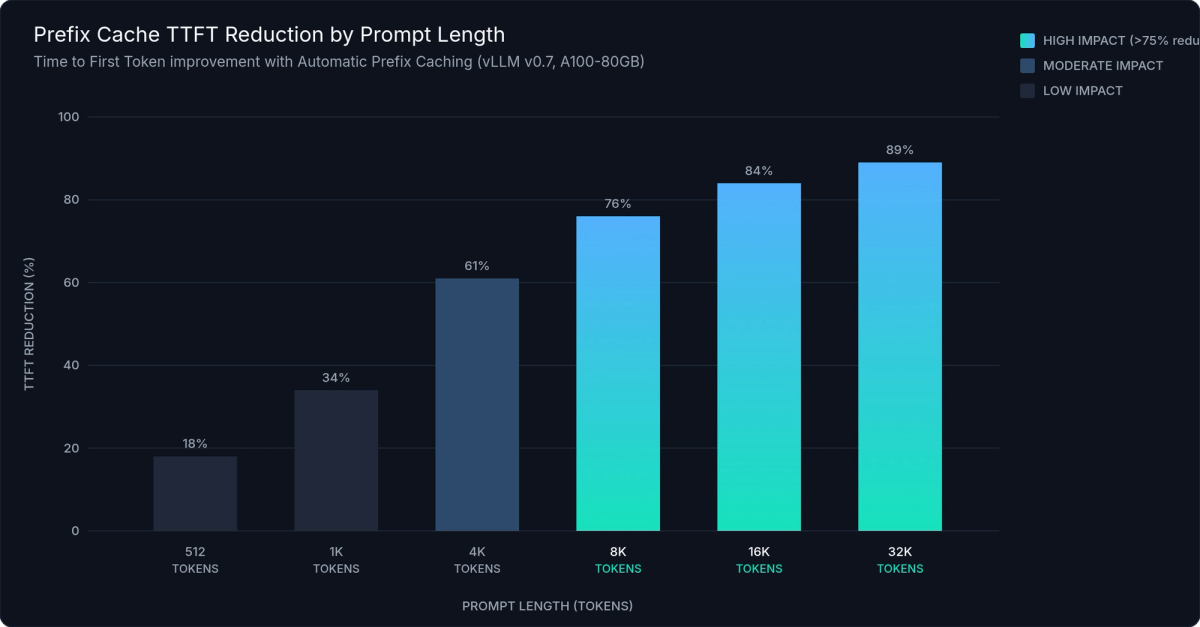
Figure 4: TTFT reduction with Automatic Prefix Caching across prompt lengths. Cache hits eliminate 50–90% of prefill compute for shared prefixes, with the greatest gains at longer prompt lengths where KV recomputation cost is highest.
Chunked Prefill
Long prompt prefill monopolises the GPU. A 32K-token prefill occupies the full forward pass compute budget, starving decode requests that are waiting in the queue for their next token. Chunked prefill solves this by splitting long prefills into budget-sized chunks and interleaving those chunks with decode steps for other requests.
With enable_chunked_prefill=True (default in vLLM 0.7), a 32K-token prefill might be split into 4 chunks of 8K tokens each. Between chunks, the Scheduler runs decode steps for concurrent requests. P99 TTFT for those concurrent short requests improves by 30–60% compared to non-chunked serving, because they're no longer blocked waiting for the full long-prompt prefill to finish.
max_num_batched_tokens controls the chunk budget per step. Higher values increase GPU utilisation per step but increase TTFT variance for short concurrent requests; lower values improve scheduling fairness at the cost of GPU efficiency. The default of 512–2048 (hardware-dependent) is a reasonable starting point for mixed workloads.
Speculative Decoding
Speculative decoding uses a small draft model to predict N tokens in a fast forward pass, then verifies all N predictions in a single forward pass of the target model. When the draft is correct — which it typically is for predictable, constrained, or formulaic outputs — you get N tokens of generation for the compute cost of one target forward pass plus one cheap draft pass.
engine_args = EngineArgs(
    model="meta-llama/Llama-3.1-70B-Instruct",
    speculative_model="meta-llama/Llama-3.2-1B-Instruct",
    num_speculative_tokens=5,
)
Speculative decoding delivers 2–3× latency reduction for constrained or repetitive output patterns: structured generation, code completion, short factual question answering, and fill-in-the-middle tasks. It does not improve throughput at high concurrency. The draft model consumes additional GPU memory and compute, and the latency benefit collapses when the target model is already saturated with batched requests.
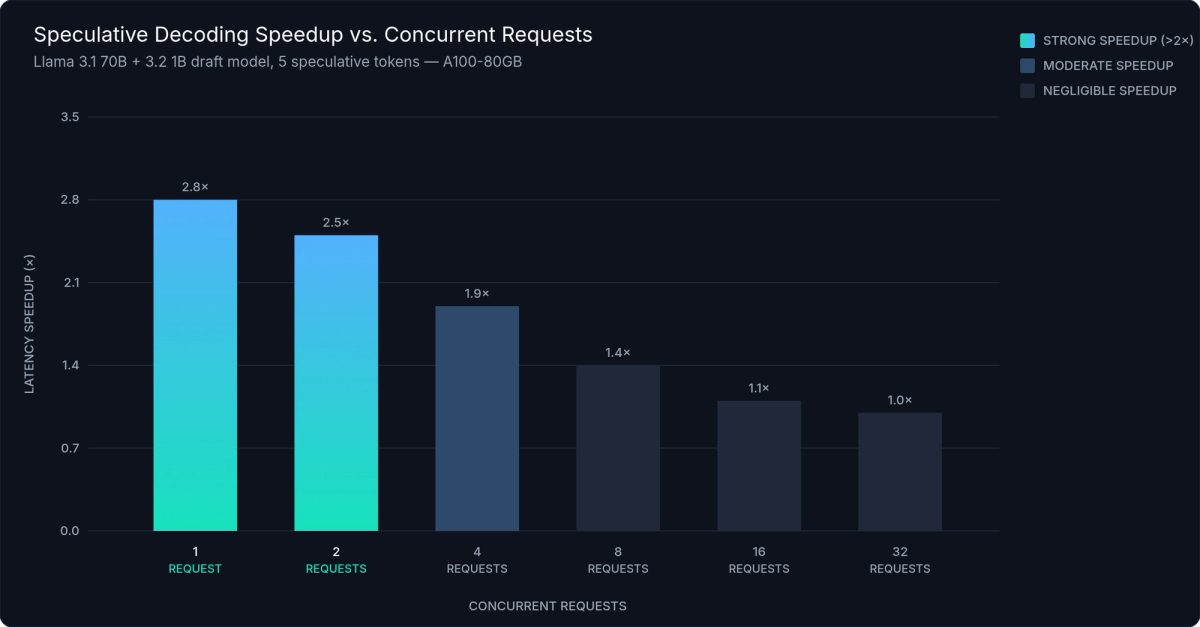
Figure 5: Speculative decoding latency improvement vs. concurrent request count. Gains are substantial (2–3×) at low concurrency and diminish above ~4 concurrent requests per GPU as the target model becomes the bottleneck.
Combining All Three
APC and chunked prefill are safe to combine and actively complement each other: APC reduces the number of tokens that need prefilling; chunked prefill ensures the remaining prefill compute doesn't block decode progress. Speculative decoding combines correctly with structured output: pass the same GuidedDecodingParams configuration and vLLM handles the draft/target alignment automatically.
For the complete performance-optimised configuration that enables all three:
"""
vLLM Performance-Optimised Configuration
-----------------------------------------
Enables all three high-impact optimisations in a single EngineArgs config:
  1. Automatic Prefix Caching (APC)
  2. Chunked Prefill
  3. Speculative Decoding
"""

from vllm import LLM, EngineArgs, SamplingParams
from vllm.sampling_params import GuidedDecodingParams

engine_args = EngineArgs(
    model="meta-llama/Llama-3.1-70B-Instruct",
    dtype="bfloat16",

    # Optimisation 1: Automatic Prefix Caching
    enable_prefix_caching=True,

    # Optimisation 2: Chunked Prefill
    enable_chunked_prefill=True,
    max_num_batched_tokens=2048,

    # Optimisation 3: Speculative Decoding
    speculative_model="meta-llama/Llama-3.2-1B-Instruct",
    num_speculative_tokens=5,

    tensor_parallel_size=4,
    gpu_memory_utilization=0.90,
    max_model_len=16384,
)

llm = LLM.from_engine_args(engine_args)

# Structured output + speculative decoding compose correctly
schema = {
    "type": "object",
    "properties": {
        "summary": {"type": "string"},
        "sentiment": {"type": "string", "enum": ["positive", "negative", "neutral"]},
        "key_points": {"type": "array", "items": {"type": "string"}},
    },
    "required": ["summary", "sentiment", "key_points"],
}

params = SamplingParams(
    temperature=0.3,
    max_tokens=512,
    guided_decoding=GuidedDecodingParams(json=schema),
)
For most chat and RAG workloads, APC + chunked prefill alone produce 40–70% throughput improvement with zero accuracy impact and near-zero configuration cost. Add speculative decoding when serving latency-sensitive requests at low-to-medium concurrency. The benefit is real below roughly four concurrent requests per GPU, and diminishes above that threshold.
---
Quantization — FP8, AWQ, and GPTQ
Quantization reduces the memory footprint of model weights and, in some cases, activations, letting you serve larger models on fewer GPUs, or increase batch sizes on existing hardware without a throughput sacrifice. vLLM supports three production-ready methods, each suited to different hardware targets and accuracy requirements.
| Method | Bit-Width | Hardware Requirement | Memory Reduction | Throughput vs. BF16 | Accuracy Impact | Best For |
|---|---|---|---|---|---|---|
| FP8 (W8A8) | 8-bit float weights + activations | NVIDIA H100, A100; AMD MI300X | ~2× | +15–30% on H100 | Near-zero (< 0.5%) | Maximum performance on H100/A100 |
| FP8 KV Cache | 8-bit float KV cache only | NVIDIA H100, A100; AMD MI300X | 50% KV reduction | Larger batch sizes | Negligible | Combine with FP8 weights |
| AWQ (W4A16) | 4-bit weights, 16-bit activations | Any CUDA GPU (A10G, L40S, RTX) | ~4× | −5–10% vs. FP8 | Low (< 2% on MMLU) | A10G / L40S / consumer GPU serving |
| GPTQ (W4A16) | 4-bit weights, 16-bit activations | Any CUDA GPU | ~4× | Similar to AWQ | Moderate (< 3–4% vs. BF16) | Models only available in GPTQ format |
| GPTQ (W8A16) | 8-bit weights, 16-bit activations | Any CUDA GPU | ~2× | Better than W4A16 | Low (< 1% vs. BF16) | When 4-bit accuracy loss is unacceptable |
FP8 (W8A8) quantizes both weights and activations to 8-bit floating point. It requires native hardware support (NVIDIA H100, A100, or AMD MI300X), but on those GPUs it is the highest-performance option. Accuracy loss versus BF16 is near-zero, memory footprint is reduced by approximately 2×, and H100's FP8 Tensor Cores deliver the full throughput benefit without the dequantization overhead present in 4-bit methods. vLLM also supports FP8 KV cache (kv_cache_dtype="fp8"), cutting KV cache memory by 50% and allowing proportionally larger batch sizes:
engine_args = EngineArgs(
    model="neuralmagic/Meta-Llama-3.1-8B-Instruct-FP8",
    quantization="fp8",
    kv_cache_dtype="fp8",
)
AWQ (Activation-Aware Weight Quantization) quantizes weights to 4-bit integers with 16-bit activations (W4A16). It works on any CUDA GPU, including A10, L40S, and consumer cards. Pre-quantized AWQ models are available on HuggingFace Hub for most popular architectures. Point vLLM at the Hub model ID with quantization="awq" and it loads the quantized weights automatically with no additional steps. Memory footprint is approximately 4× smaller than BF16; throughput runs 5–10% lower than FP8 on equivalent hardware, due to the runtime dequantization required during each forward pass.
GPTQ also produces W4A16 models with the widest model availability of any quantization method on HuggingFace Hub. Accuracy at the same bit-width is slightly below AWQ (GPTQ's layer-wise post-training optimisation is less activation-aware), but GPTQ versions often exist for architectures where AWQ models don't. Load with quantization="gptq".
"""
vLLM Quantization: FP8, AWQ, and GPTQ
---------------------------------------
All three methods load identically — point vLLM at the HuggingFace Hub
model ID with the appropriate quantization flag.
"""

from vllm import LLM, SamplingParams

# FP8 — H100/A100 only; highest performance; near-zero accuracy loss
llm_fp8 = LLM(
    model="neuralmagic/Meta-Llama-3.1-70B-Instruct-FP8",
    quantization="fp8",
    kv_cache_dtype="fp8",          # FP8 KV cache: 50% reduction in KV memory
    dtype="auto",
    tensor_parallel_size=4,
    gpu_memory_utilization=0.90,
    enable_prefix_caching=True,
)

# AWQ — any CUDA GPU; ~4× memory reduction; wide Hub availability
llm_awq = LLM(
    model="TheBloke/Llama-2-70B-Chat-AWQ",
    quantization="awq",
    dtype="auto",
    tensor_parallel_size=2,
    gpu_memory_utilization=0.90,
)

# GPTQ — widest model availability; slightly lower accuracy than AWQ
llm_gptq = LLM(
    model="TheBloke/Mixtral-8x7B-Instruct-v0.1-GPTQ",
    quantization="gptq",
    dtype="auto",
    tensor_parallel_size=2,
)

# FP8 + TP=8: standard 70B config on a single H100 node
llm_fp8_tp8 = LLM(
    model="neuralmagic/Meta-Llama-3.1-70B-Instruct-FP8",
    quantization="fp8",
    kv_cache_dtype="fp8",
    dtype="auto",
    tensor_parallel_size=8,
    gpu_memory_utilization=0.92,
    enable_prefix_caching=True,
    enable_chunked_prefill=True,
    max_model_len=32768,
)
Quantization composes transparently with tensor parallelism. vLLM shards quantized weight matrices across GPUs exactly as it would full-precision weights. No manual handling required. FP8 + TP=8 on a single H100 node is the standard configuration for serving 70B-class models with maximum throughput. For teams on A10/L40 hardware, AWQ + TP=4 across four cards makes 70B serving feasible where full-precision weights would not fit, without sacrificing more than a few percentage points of benchmark accuracy.
---
Custom Models and Multi-LoRA Serving
Two extension points matter most for teams building production vLLM custom inference pipeline systems: registering novel model architectures without forking vLLM, and serving multiple fine-tuned LoRA adapters from a single engine instance.
Registering a Custom Model Architecture
vLLM's model zoo lives in vllm/model_executor/models/. Every model in that directory follows the same interface: a forward() method, a load_weights() method, and optional supported_lora_modules for LoRA compatibility. Custom models extend this interface without touching vLLM source code.
Registration uses the ModelRegistry decorator, which binds your class to an architecture name string that matches the architectures field in the model's config.json:
from vllm import ModelRegistry
from vllm.config import VllmConfig

@ModelRegistry.register_model("MyCustomLlamaVariant")
class MyCustomLlamaVariant(nn.Module):
    def __init__(self, vllm_config: VllmConfig, prefix: str = ""):
        super().__init__()
        # VllmConfig carries the complete engine configuration —
        # model config, parallel config, quant config, cache config.
        # Always use it instead of separate constructor arguments.
        self.config = vllm_config.model_config.hf_config
        ...

    def forward(self, input_ids, positions, kv_caches, ...):
        ...

    def load_weights(self, weights: Iterable[Tuple[str, torch.Tensor]]):
        ...
"""
vLLM Custom Model Architecture Registration
---------------------------------------------
Register a novel model architecture without modifying vLLM source code.
Import this module BEFORE instantiating the engine — the decorator
registers the class at import time.
"""
import torch
import torch.nn as nn
from typing import Iterable, Tuple
from vllm import LLM, ModelRegistry, SamplingParams
from vllm.config import VllmConfig
from vllm.model_executor.layers.linear import ColumnParallelLinear, RowParallelLinear
from vllm.model_executor.layers.vocab_parallel_embedding import (
VocabParallelEmbedding, ParallelLMHead,
)
@ModelRegistry.register_model("MyCustomLlamaVariant")
class MyCustomLlamaVariant(nn.Module):
# Declare LoRA-compatible modules
supported_lora_modules = ["q_proj", "v_proj", "o_proj", "gate_proj"]
embedding_modules = {}
embedding_padding_modules = []
def __init__(self, vllm_config: VllmConfig, prefix: str = ""):
super().__init__()
hf_config = vllm_config.model_config.hf_config
self.embed_tokens = VocabParallelEmbedding(
num_embeddings=hf_config.vocab_size,
embedding_dim=hf_config.hidden_size,
)
self.q_proj = ColumnParallelLinear(
input_size=hf_config.hidden_size,
output_size=hf_config.num_attention_heads * hf_config.head_dim,
bias=False,
)
self.lm_head = ParallelLMHead(
num_embeddings=hf_config.vocab_size,
embedding_dim=hf_config.hidden_size,
)
self.config = hf_config
def forward(self, input_ids, positions, kv_caches, attn_metadata, **kwargs):
hidden_states = self.embed_tokens(input_ids)
# ... custom attention and MLP logic ...
return self.lm_head(hidden_states)
def load_weights(self, weights: Iterable[Tuple[str, torch.Tensor]]):
params_dict = dict(self.named_parameters())
for name, weight in weights:
if name in params_dict:
params_dict[name].data.copy_(weight)
# Import this module before LLM instantiation — registration happens at import time
llm = LLM(model="/path/to/my-custom-model/", dtype="bfloat16")The VllmConfig object contains the full engine configuration at init time: model config, parallel config, quantization config, and cache config. Using it instead of parsing constructor arguments separately keeps your custom model compatible across vLLM versions. The registry pattern keeps your custom model as a standalone Python module. Import it before instantiating the engine, and vLLM handles the rest without any source modifications.
Multi-LoRA Serving
Multi-LoRA serving is one of vLLM's most valuable capabilities for production fine-tune platforms. A single running engine instance can serve dozens of LoRA adapters simultaneously. Each request gets routed to the correct fine-tune without restarting the engine or maintaining separate model server processes per adapter.
Enable multi-LoRA in EngineArgs:
engine_args = EngineArgs(
    model="meta-llama/Llama-3.1-8B-Instruct",
    enable_lora=True,
    max_loras=4,          # max adapters resident on GPU simultaneously
    max_cpu_loras=16,     # LRU cache in CPU RAM before falling back to disk
    max_lora_rank=64,     # must match or exceed adapter rank at training time
)
Pass a LoRARequest when generating to specify which adapter handles the request:
from vllm.lora.request import LoRARequest

outputs = llm.generate(
    prompt,
    sampling_params,
    lora_request=LoRARequest(
        lora_name="customer-a-assistant",
        lora_int_id=1,           # unique integer ID per adapter
        lora_local_path="/adapters/customer-a/"
    )
)
"""
vLLM Multi-LoRA Serving — Multiple Adapters from a Single Engine
-----------------------------------------------------------------
Serves dozens of LoRA-fine-tuned adapters from a single base model instance.
"""
from vllm import LLM, SamplingParams
from vllm.lora.request import LoRARequest
llm = LLM(
model="meta-llama/Llama-3.1-8B-Instruct",
dtype="bfloat16",
enable_lora=True,
max_loras=4, # max adapters on GPU simultaneously
max_cpu_loras=16, # LRU cache in CPU RAM
max_lora_rank=64,
gpu_memory_utilization=0.90,
enable_prefix_caching=True,
)
ADAPTERS = {
"customer-a": LoRARequest("customer-a", 1, "/adapters/customer-a/"),
"customer-b": LoRARequest("customer-b", 2, "/adapters/customer-b/"),
"customer-c": LoRARequest("customer-c", 3, "/adapters/customer-c/"),
"customer-d": LoRARequest("customer-d", 4, "/adapters/customer-d/"),
# Adapters beyond max_loras=4 are held in CPU LRU cache and reloaded on demand
"customer-e": LoRARequest("customer-e", 5, "/adapters/customer-e/"),
}
def generate(prompt: str, customer_id: str) -> str:
output = llm.generate(
prompt,
SamplingParams(temperature=0.7, max_tokens=512),
lora_request=ADAPTERS.get(customer_id),
)
return output[0].outputs[0].text
# Mixed adapter batch — requests with different adapters can share a forward pass
requests = [
{"prompt": "How do I reset my password?", "customer_id": "customer-a"},
{"prompt": "Write a binary search in Python.", "customer_id": "customer-b"},
{"prompt": "Summarise the key clauses in an NDA.", "customer_id": "customer-c"},
]
outputs = llm.generate(
[r["prompt"] for r in requests],
[SamplingParams(temperature=0.7, max_tokens=512)] * len(requests),
lora_request=[ADAPTERS.get(r["customer_id"]) for r in requests],
)When more adapters are requested than max_loras GPU slots allow, vLLM evicts the least-recently-used adapter to CPU RAM (up to max_cpu_loras adapters held in the CPU LRU cache), then reloads on demand. The eviction and reload are transparent to the caller. The first request after a cold eviction takes slightly longer; subsequent requests for that adapter are fast again.
The production use case this enables: one H100 running a single base model instance, routing requests across 50 or more customer-specific fine-tuned adapters by lora_int_id, with the adapter weights managed automatically. Compared to running 50 separate model servers, the reduction in GPU hours is substantial. You pay for base model weights once, and every adapter shares that cost.
---
Production Patterns — Serving, Routing, and Observability
The gap between "works locally" and "runs reliably in production" for vLLM comes down to three areas: the correct serve configuration, a load balancing strategy, and proper observability. All three are first-class in vLLM 0.7.
The OpenAI-Compatible Server
vllm serve starts an OpenAI API-compatible HTTP server. The production-ready command looks like this:
#!/usr/bin/env bash
# vLLM Production Server — OpenAI-Compatible HTTP Endpoint
# ---------------------------------------------------------

set -euo pipefail

MODEL_PATH="meta-llama/Llama-3.1-8B-Instruct"
SERVED_MODEL_NAME="llama-3-8b"   # client-facing alias; swap model versions
                                   # without changing any client configuration

exec vllm serve "${MODEL_PATH}" \
    --host "0.0.0.0" \
    --port "8000" \
    --served-model-name "${SERVED_MODEL_NAME}" \
    --tensor-parallel-size 4 \
    --dtype bfloat16 \
    --max-model-len 16384 \
    --max-num-seqs 256 \
    --gpu-memory-utilization 0.90 \
    --enable-prefix-caching \
    --enable-chunked-prefill \
    --uvicorn-log-level warning \
    --disable-log-requests \
    --api-key "${VLLM_API_KEY:-}"

# Kubernetes health probe configuration:
# readinessProbe:
#   httpGet:
#     path: /health
#     port: 8000
#   initialDelaySeconds: 60    # allow time for model load + CUDA graph warmup
# livenessProbe:
#   httpGet:
#     path: /health
#     port: 8000
#   initialDelaySeconds: 120
--served-model-name creates a client-facing alias. Downstream systems use the friendly name while you swap the underlying model version without changing any client configuration. --api-key adds simple bearer token authentication at the server level. --max-model-len overrides maximum sequence length, letting you trade maximum context window for larger batch sizes in KV cache memory. --enable-prefix-caching and --enable-chunked-prefill should always be set for any vLLM production deployment.
The server supports tool calling, vision inputs for multimodal models, and text embeddings via /v1/embeddings; all from the same vllm serve process.
Disaggregated Prefill
At high request volumes (100+ RPS), prefill and decode contend for the same GPU compute. A large prefill job blocks all pending decode steps. Disaggregated prefill separates the two roles: a fleet of prefill-focused instances processes incoming prompts and transfers the resulting KV cache blocks to a separate fleet of decode instances that handle token generation.
Configure it with --kv-transfer-config (experimental in vLLM 0.7). Disaggregated prefill eliminates head-of-line blocking between long-context and short-context requests at scale; it's the architecture direction for high-concurrency vLLM production deployment, and support is maturing rapidly through 2026.
Health, Metrics, and Tracing
The /health endpoint returns HTTP 200 when the engine is warm and ready. Use it in Kubernetes readinessProbe and livenessProbe configurations. The engine fails health checks during model loading and CUDA graph warmup, which prevents traffic from reaching pods before they're ready to serve.
The /metrics endpoint exposes Prometheus-format metrics. The five you should always alert on:
vllm:e2e_request_latency_seconds— end-to-end latency histogram; alert on P99vllm:time_to_first_token_seconds— TTFT histogram, the primary user-facing latency metricvllm:time_per_output_token_seconds— decode speed per token; degradation signals KV cache pressurevllm:num_requests_running— active request count gauge; sustained saturation indicates need to scalevllm:gpu_cache_usage_perc— KV cache utilisation; alert at >90%, indicating memory pressure that will cause request preemption
OpenTelemetry tracing is available via --otlp-traces-endpoint. Per-request spans include scheduler queue time, prefill time, and decode time — enabling precise attribution when investigating latency regressions. Wire this to your existing OTEL collector alongside application and infrastructure traces for end-to-end visibility.
---
vLLM vs. SGLang, TGI, and TensorRT-LLM
vLLM is the right default for most teams: it has the widest model support, the most mature production track record, and the richest API for custom pipeline work. But understanding where the alternatives win helps you make the right call when requirements push to the edges.
Framework comparison:
| Dimension | vLLM | SGLang | TGI (Text Generation Inference) | TensorRT-LLM |
|---|---|---|---|---|
| Setup Complexity | Low — pip install vllm && vllm serve model | Low-Medium | Very Low — single Docker command | High — model compilation per GPU type |
| Model Coverage | Widest — 40+ architectures | Moderate — major architectures | Moderate — HuggingFace Hub models | Narrow — NVIDIA-optimised only |
| Throughput (high concurrency) | Excellent — PagedAttention + APC + chunked prefill | Excellent — RadixAttention edge for prefix-heavy workloads | Good — competitive for standard serving | Best — compiled TRT engines |
| Custom Model Support | Excellent — ModelRegistry decorator; no source fork | Good — plugin architecture | Limited — significant extra effort | Poor — custom TRT-LLM plugin required |
| Custom Pipeline API | Excellent — LLMEngine, AsyncLLMEngine, step-based loop | Good — Runtime API | Limited — standard HTTP only | None — deployment-only |
| Structured Output | Excellent — GuidedDecodingParams with JSON/regex/grammar | Good — native SGLang programs | Basic — post-hoc parsing only | None |
| Multi-LoRA Serving | Excellent — per-request routing, LRU eviction | Good — less mature than vLLM | Limited — no dynamic per-request routing | Partial — select architectures only |
| Managed Hosting | inference.net, Anyscale, Modal, Together AI | Limited | HuggingFace Inference Endpoints | NVIDIA NIM |
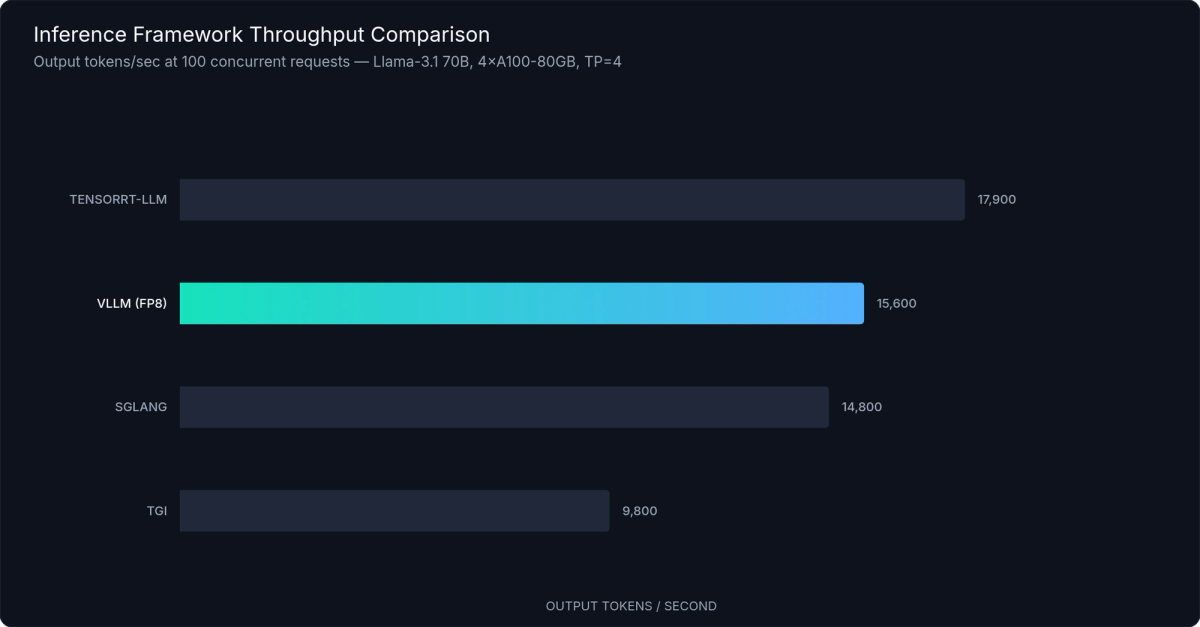
Figure 6: Throughput comparison at 100 concurrent requests (tokens/second). vLLM delivers competitive throughput across architectures; TensorRT-LLM leads on NVIDIA-optimised models at the cost of build complexity and model coverage.
SGLang is the strongest alternative when your workload involves tree-structured prefix sharing (multi-turn agents, constrained generation programs, or complex multi-call pipelines where multiple branches share a common prefix). Its RadixAttention mechanism is purpose-built for prefix reuse across generation tree branches, giving it a latency edge over vLLM's APC in heavily branching workloads. The trade-off is narrower model coverage and a smaller community ecosystem.
TGI (Text Generation Inference) offers the smoothest path for teams already operating within the HuggingFace ecosystem. Setup is minimal, documentation is accessible for newer practitioners, and it handles most standard serving requirements without configuration tuning. It's less suited for custom inference pipeline work. TGI's API is less flexible than vLLM's LLMEngine, and custom model registration requires considerably more effort. Best for quick internal deployments where operational simplicity beats raw configurability.
TensorRT-LLM delivers the highest raw throughput on NVIDIA hardware by compiling models into TensorRT execution engines optimised for a specific GPU target. The cost is a complex build pipeline that must be repeated per model per GPU type, limited model coverage to architectures NVIDIA has explicitly optimised, and slow iteration cycles that make it poorly suited for research or rapid development. Start every new deployment with vLLM. Benchmark against TRT-LLM only if throughput requirements demonstrably cannot be met — in practice, vLLM with FP8 quantization closes much of the gap.
The decision framework: use vLLM for any new deployment. Switch to SGLang if profiling reveals prefix-reuse bottlenecks that APC doesn't fully address and your workload is heavily multi-turn or agent-oriented. Evaluate TensorRT-LLM only when vLLM + FP8 + fully-tuned configuration still misses your throughput SLA after exhausting the optimisations in Section 5.
---
Conclusion
The gap between basic vLLM usage and production-grade inference engineering is real, but every step is concrete. The four-layer V1 engine architecture explains why the API works the way it does. LLMEngine and AsyncLLMEngine give you direct scheduler access for custom pipeline logic and streaming servers. SamplingParams with GuidedDecodingParams extends your control over generation to structured output that's correct by construction. TP/PP/EP parallelism, quantization, and prefix caching compose into a complete performance stack that handles everything from single-GPU deployments to multi-node 405B serving.
Three practical changes worth making now: replace LLM.generate() with LLMEngine in any pipeline that needs custom logic or streaming; enable prefix caching and chunked prefill by default — both cost almost nothing to enable for any production workload; try guided decoding on your next structured extraction task and eliminate the validation layer entirely.
Running your own vLLM cluster adds real operational complexity: GPU driver management, CUDA version pinning, autoscaling logic, and monitoring infrastructure all need ongoing attention. inference.net provides managed vLLM endpoints with automatic scaling, a built-in Prometheus-compatible metrics dashboard, and an integrated request router. Get started here.
---
References
- vLLM Official Documentation — docs.vllm.ai
- Kwon et al., "Efficient Memory Management for Large Language Model Serving with PagedAttention," SOSP 2023
- vLLM V1 Engine Architecture — vLLM Blog, 2024
- vLLM Automatic Prefix Caching — docs.vllm.ai/en/latest/automatic_prefix_caching
- vLLM Chunked Prefill — vLLM GitHub, 2024
- vLLM Speculative Decoding — docs.vllm.ai/en/latest/speculative_decoding
- vLLM Quantization Documentation — docs.vllm.ai/en/latest/quantization
- vLLM Structured Outputs — docs.vllm.ai/en/latest/structured_outputs
- vLLM Distributed Inference and Serving — docs.vllm.ai/en/latest/distributed_inference
- vLLM LoRA Adapters — docs.vllm.ai/en/latest/lora
- vLLM Adding a New Model — docs.vllm.ai/en/latest/adding_a_new_model
- vLLM OpenAI-Compatible Server — docs.vllm.ai/en/latest/serving
- vLLM Metrics and Monitoring — docs.vllm.ai/en/latest/metrics
- Zheng et al., "SGLang: Efficient Execution of Structured Language Model Programs," 2024
- Text Generation Inference (TGI) — huggingface.co/docs/text-generation-inference
- TensorRT-LLM Documentation — NVIDIA, 2024
- Lin et al., "AWQ: Activation-aware Weight Quantization for LLM Compression and Acceleration," 2023
- Frantar et al., "GPTQ: Accurate Post-Training Quantization for Generative Pre-trained Transformers," 2022
Meet with our research team
Schedule a call with our research team to learn more Specialized Language Models can cut costs and improve performance.