'%3e%3crect%20x='2'%20y='1.64014'%20width='48'%20height='48'%20rx='24'%20fill='%23292929'/%3e%3crect%20x='2.625'%20y='2.26514'%20width='46.75'%20height='46.75'%20rx='23.375'%20stroke='%23636363'%20stroke-width='1.25'/%3e%3cpath%20d='M22.6665%2025.6402L24.8887%2027.8624L29.8887%2022.8624M20.8151%2016.5498C21.7082%2016.4786%2022.5561%2016.1273%2023.2381%2015.5462C24.8295%2014.19%2027.1701%2014.19%2028.7615%2015.5462C29.4434%2016.1273%2030.2913%2016.4786%2031.1845%2016.5498C33.2687%2016.7162%2034.9238%2018.3712%2035.0901%2020.4555C35.1614%2021.3486%2035.5126%2022.1965%2036.0938%2022.8785C37.4499%2024.4699%2037.4499%2026.8105%2036.0938%2028.4019C35.5126%2029.0838%2035.1614%2029.9317%2035.0901%2030.8249C34.9238%2032.9091%2033.2687%2034.5642%2031.1845%2034.7305C30.2913%2034.8018%2029.4434%2035.153%2028.7615%2035.7341C27.1701%2037.0903%2024.8295%2037.0903%2023.2381%2035.7341C22.5561%2035.153%2021.7082%2034.8018%2020.8151%2034.7305C18.7308%2034.5642%2017.0758%2032.9091%2016.9094%2030.8249C16.8382%2029.9317%2016.487%2029.0838%2015.9058%2028.4019C14.5496%2026.8105%2014.5496%2024.4699%2015.9058%2022.8785C16.487%2022.1965%2016.8382%2021.3486%2016.9094%2020.4555C17.0758%2018.3712%2018.7308%2016.7161%2020.8151%2016.5498Z'%20stroke='%23E7E7E7'%20stroke-width='1.125'%20stroke-linecap='round'%20stroke-linejoin='round'/%3e%3c/g%3e%3cdefs%3e%3cfilter%20id='filter0_d_411_10857'%20x='0.5'%20y='0.140137'%20width='51'%20height='51'%20filterUnits='userSpaceOnUse'%20color-interpolation-filters='sRGB'%3e%3cfeFlood%20flood-opacity='0'%20result='BackgroundImageFix'/%3e%3cfeColorMatrix%20in='SourceAlpha'%20type='matrix'%20values='0%200%200%200%200%200%200%200%200%200%200%200%200%200%200%200%200%200%20127%200'%20result='hardAlpha'/%3e%3cfeMorphology%20radius='1.5'%20operator='dilate'%20in='SourceAlpha'%20result='effect1_dropShadow_411_10857'/%3e%3cfeOffset/%3e%3cfeComposite%20in2='hardAlpha'%20operator='out'/%3e%3cfeColorMatrix%20type='matrix'%20values='0%200%200%200%200.08%200%200%200%200%200.08%200%200%200%200%200.08%200%200%200%201%200'/%3e%3cfeBlend%20mode='normal'%20in2='BackgroundImageFix'%20result='effect1_dropShadow_411_10857'/%3e%3cfeBlend%20mode='normal'%20in='SourceGraphic'%20in2='effect1_dropShadow_411_10857'%20result='shape'/%3e%3c/filter%3e%3c/defs%3e%3c/svg%3e)
'%3e%3crect%20x='2'%20y='1.64014'%20width='48'%20height='48'%20rx='24'%20fill='%23292929'/%3e%3crect%20x='2.625'%20y='2.26514'%20width='46.75'%20height='46.75'%20rx='23.375'%20stroke='%23636363'%20stroke-width='1.25'/%3e%3cpath%20d='M21.5556%2015.6401H19.5556C18.311%2015.6401%2017.6887%2015.6401%2017.2134%2015.8823C16.7952%2016.0954%2016.4553%2016.4354%2016.2422%2016.8535C16%2017.3289%2016%2017.9511%2016%2019.1957V21.1957M21.5556%2035.6401H19.5556C18.311%2035.6401%2017.6887%2035.6401%2017.2134%2035.3979C16.7952%2035.1849%2016.4553%2034.8449%2016.2422%2034.4268C16%2033.9514%2016%2033.3291%2016%2032.0846V30.0846M36%2021.1957V19.1957C36%2017.9511%2036%2017.3289%2035.7578%2016.8535C35.5447%2016.4354%2035.2048%2016.0954%2034.7866%2015.8823C34.3113%2015.6401%2033.689%2015.6401%2032.4444%2015.6401H30.4444M36%2030.0846V32.0846C36%2033.3291%2036%2033.9514%2035.7578%2034.4268C35.5447%2034.8449%2035.2048%2035.1849%2034.7866%2035.3979C34.3113%2035.6401%2033.689%2035.6401%2032.4444%2035.6401H30.4444M30.4444%2025.6401C30.4444%2028.0947%2028.4546%2030.0846%2026%2030.0846C23.5454%2030.0846%2021.5556%2028.0947%2021.5556%2025.6401C21.5556%2023.1855%2023.5454%2021.1957%2026%2021.1957C28.4546%2021.1957%2030.4444%2023.1855%2030.4444%2025.6401Z'%20stroke='%23E7E7E7'%20stroke-width='1.125'%20stroke-linecap='round'%20stroke-linejoin='round'/%3e%3c/g%3e%3cdefs%3e%3cfilter%20id='filter0_d_1154_2040'%20x='0.5'%20y='0.140137'%20width='51'%20height='51'%20filterUnits='userSpaceOnUse'%20color-interpolation-filters='sRGB'%3e%3cfeFlood%20flood-opacity='0'%20result='BackgroundImageFix'/%3e%3cfeColorMatrix%20in='SourceAlpha'%20type='matrix'%20values='0%200%200%200%200%200%200%200%200%200%200%200%200%200%200%200%200%200%20127%200'%20result='hardAlpha'/%3e%3cfeMorphology%20radius='1.5'%20operator='dilate'%20in='SourceAlpha'%20result='effect1_dropShadow_1154_2040'/%3e%3cfeOffset/%3e%3cfeComposite%20in2='hardAlpha'%20operator='out'/%3e%3cfeColorMatrix%20type='matrix'%20values='0%200%200%200%200.08%200%200%200%200%200.08%200%200%200%200%200.08%200%200%200%201%200'/%3e%3cfeBlend%20mode='normal'%20in2='BackgroundImageFix'%20result='effect1_dropShadow_1154_2040'/%3e%3cfeBlend%20mode='normal'%20in='SourceGraphic'%20in2='effect1_dropShadow_1154_2040'%20result='shape'/%3e%3c/filter%3e%3c/defs%3e%3c/svg%3e)
'%3e%3crect%20x='2'%20y='1.64014'%20width='48'%20height='48'%20rx='24'%20fill='%23292929'/%3e%3crect%20x='2.625'%20y='2.26514'%20width='46.75'%20height='46.75'%20rx='23.375'%20stroke='%23636363'%20stroke-width='1.25'/%3e%3cpath%20d='M23.7778%2031.9275V34.5291C23.7778%2035.7564%2024.7727%2036.7513%2026%2036.7513C27.2273%2036.7513%2028.2222%2035.7564%2028.2222%2034.5291V31.9275M26%2014.5291V15.6402M16%2025.6402H14.8889M18.7778%2018.4179L18.111%2017.7512M33.2222%2018.4179L33.8892%2017.7512M37.1111%2025.6402H36M32.6667%2025.6402C32.6667%2029.3221%2029.6819%2032.3068%2026%2032.3068C22.3181%2032.3068%2019.3333%2029.3221%2019.3333%2025.6402C19.3333%2021.9583%2022.3181%2018.9735%2026%2018.9735C29.6819%2018.9735%2032.6667%2021.9583%2032.6667%2025.6402Z'%20stroke='%23E7E7E7'%20stroke-width='1.125'%20stroke-linecap='round'%20stroke-linejoin='round'/%3e%3c/g%3e%3cdefs%3e%3cfilter%20id='filter0_d_1117_17437'%20x='0.5'%20y='0.140137'%20width='51'%20height='51'%20filterUnits='userSpaceOnUse'%20color-interpolation-filters='sRGB'%3e%3cfeFlood%20flood-opacity='0'%20result='BackgroundImageFix'/%3e%3cfeColorMatrix%20in='SourceAlpha'%20type='matrix'%20values='0%200%200%200%200%200%200%200%200%200%200%200%200%200%200%200%200%200%20127%200'%20result='hardAlpha'/%3e%3cfeMorphology%20radius='1.5'%20operator='dilate'%20in='SourceAlpha'%20result='effect1_dropShadow_1117_17437'/%3e%3cfeOffset/%3e%3cfeComposite%20in2='hardAlpha'%20operator='out'/%3e%3cfeColorMatrix%20type='matrix'%20values='0%200%200%200%200.08%200%200%200%200%200.08%200%200%200%200%200.08%200%200%200%201%200'/%3e%3cfeBlend%20mode='normal'%20in2='BackgroundImageFix'%20result='effect1_dropShadow_1117_17437'/%3e%3cfeBlend%20mode='normal'%20in='SourceGraphic'%20in2='effect1_dropShadow_1117_17437'%20result='shape'/%3e%3c/filter%3e%3c/defs%3e%3c/svg%3e)
'%3e%3crect%20x='2.33301'%20y='2'%20width='48'%20height='48'%20rx='24'%20fill='%23292929'/%3e%3crect%20x='2.95801'%20y='2.625'%20width='46.75'%20height='46.75'%20rx='23.375'%20stroke='%23636363'%20stroke-width='1.25'/%3e%3cpath%20d='M18.5557%2022.6665H34.1112M18.5557%2029.3332H34.1112'%20stroke='%23E7E7E7'%20stroke-width='1.125'%20stroke-linecap='round'%20stroke-linejoin='round'/%3e%3c/g%3e%3cdefs%3e%3cfilter%20id='filter0_d_1851_59239'%20x='0.833008'%20y='0.5'%20width='51'%20height='51'%20filterUnits='userSpaceOnUse'%20color-interpolation-filters='sRGB'%3e%3cfeFlood%20flood-opacity='0'%20result='BackgroundImageFix'/%3e%3cfeColorMatrix%20in='SourceAlpha'%20type='matrix'%20values='0%200%200%200%200%200%200%200%200%200%200%200%200%200%200%200%200%200%20127%200'%20result='hardAlpha'/%3e%3cfeMorphology%20radius='1.5'%20operator='dilate'%20in='SourceAlpha'%20result='effect1_dropShadow_1851_59239'/%3e%3cfeOffset/%3e%3cfeComposite%20in2='hardAlpha'%20operator='out'/%3e%3cfeColorMatrix%20type='matrix'%20values='0%200%200%200%200.08%200%200%200%200%200.08%200%200%200%200%200.08%200%200%200%201%200'/%3e%3cfeBlend%20mode='normal'%20in2='BackgroundImageFix'%20result='effect1_dropShadow_1851_59239'/%3e%3cfeBlend%20mode='normal'%20in='SourceGraphic'%20in2='effect1_dropShadow_1851_59239'%20result='shape'/%3e%3c/filter%3e%3c/defs%3e%3c/svg%3e)
'%3e%3crect%20x='2'%20y='2.14014'%20width='48'%20height='48'%20rx='24'%20fill='%23292929'/%3e%3crect%20x='2.625'%20y='2.76514'%20width='46.75'%20height='46.75'%20rx='23.375'%20stroke='%23636363'%20stroke-width='1.25'/%3e%3cpath%20d='M22.6667%2015.0288V17.251M29.3333%2015.0288V17.251M22.6667%2035.0288V37.251M29.3333%2035.0288V37.251M34.8889%2022.8066H37.1111M34.8889%2028.3621H37.1111M14.8889%2022.8066H17.1111M14.8889%2028.3621H17.1111M22.4444%2035.0288H29.5556C31.4224%2035.0288%2032.3558%2035.0288%2033.0689%2034.6655C33.6961%2034.3459%2034.206%2033.836%2034.5256%2033.2088C34.8889%2032.4957%2034.8889%2031.5623%2034.8889%2029.6955V22.5844C34.8889%2020.7175%2034.8889%2019.7841%2034.5256%2019.0711C34.206%2018.4439%2033.6961%2017.9339%2033.0689%2017.6143C32.3558%2017.251%2031.4224%2017.251%2029.5556%2017.251H22.4444C20.5776%2017.251%2019.6442%2017.251%2018.9311%2017.6143C18.3039%2017.9339%2017.794%2018.4439%2017.4744%2019.0711C17.1111%2019.7841%2017.1111%2020.7175%2017.1111%2022.5844V29.6955C17.1111%2031.5623%2017.1111%2032.4957%2017.4744%2033.2088C17.794%2033.836%2018.3039%2034.3459%2018.9311%2034.6655C19.6442%2035.0288%2020.5776%2035.0288%2022.4444%2035.0288ZM24.4444%2029.4733H27.5556C28.1778%2029.4733%2028.489%2029.4733%2028.7267%2029.3522C28.9357%2029.2456%2029.1057%2029.0756%2029.2122%2028.8666C29.3333%2028.6289%2029.3333%2028.3178%2029.3333%2027.6955V24.5844C29.3333%2023.9621%2029.3333%2023.6509%2029.2122%2023.4133C29.1057%2023.2042%2028.9357%2023.0342%2028.7267%2022.9277C28.489%2022.8066%2028.1778%2022.8066%2027.5556%2022.8066H24.4444C23.8222%2022.8066%2023.511%2022.8066%2023.2733%2022.9277C23.0643%2023.0342%2022.8943%2023.2042%2022.7878%2023.4133C22.6667%2023.6509%2022.6667%2023.9621%2022.6667%2024.5844V27.6955C22.6667%2028.3178%2022.6667%2028.6289%2022.7878%2028.8666C22.8943%2029.0756%2023.0643%2029.2456%2023.2733%2029.3522C23.511%2029.4733%2023.8222%2029.4733%2024.4444%2029.4733Z'%20stroke='%23E7E7E7'%20stroke-width='1.125'%20stroke-linecap='round'%20stroke-linejoin='round'/%3e%3c/g%3e%3cdefs%3e%3cfilter%20id='filter0_d_1117_10655'%20x='0.5'%20y='0.640137'%20width='51'%20height='51'%20filterUnits='userSpaceOnUse'%20color-interpolation-filters='sRGB'%3e%3cfeFlood%20flood-opacity='0'%20result='BackgroundImageFix'/%3e%3cfeColorMatrix%20in='SourceAlpha'%20type='matrix'%20values='0%200%200%200%200%200%200%200%200%200%200%200%200%200%200%200%200%200%20127%200'%20result='hardAlpha'/%3e%3cfeMorphology%20radius='1.5'%20operator='dilate'%20in='SourceAlpha'%20result='effect1_dropShadow_1117_10655'/%3e%3cfeOffset/%3e%3cfeComposite%20in2='hardAlpha'%20operator='out'/%3e%3cfeColorMatrix%20type='matrix'%20values='0%200%200%200%200.08%200%200%200%200%200.08%200%200%200%200%200.08%200%200%200%201%200'/%3e%3cfeBlend%20mode='normal'%20in2='BackgroundImageFix'%20result='effect1_dropShadow_1117_10655'/%3e%3cfeBlend%20mode='normal'%20in='SourceGraphic'%20in2='effect1_dropShadow_1117_10655'%20result='shape'/%3e%3c/filter%3e%3c/defs%3e%3c/svg%3e)

'%3e%3crect%20x='1.66699'%20y='2'%20width='48'%20height='48'%20rx='24'%20fill='%23292929'/%3e%3crect%20x='2.29199'%20y='2.625'%20width='46.75'%20height='46.75'%20rx='23.375'%20stroke='%23636363'%20stroke-width='1.25'/%3e%3cpath%20d='M35.667%2032.6667L34.5557%2033.8823C33.9664%2034.5269%2033.1672%2034.8889%2032.3338%2034.8889C31.5004%2034.8889%2030.7012%2034.5269%2030.1119%2033.8823C29.5217%2033.2391%2028.7225%2032.8779%2027.8894%2032.8779C27.0563%2032.8779%2026.2571%2033.2391%2025.667%2033.8823M15.667%2034.8889H17.5276C18.0711%2034.8889%2018.3429%2034.8889%2018.5986%2034.8275C18.8254%2034.7731%2019.0422%2034.6833%2019.241%2034.5615C19.4652%2034.424%2019.6574%2034.2319%2020.0418%2033.8475L34.0004%2019.8889C34.9208%2018.9684%2034.9208%2017.4761%2034.0004%2016.5556C33.0799%2015.6351%2031.5875%2015.6351%2030.667%2016.5556L16.7084%2030.5142C16.3241%2030.8985%2016.1319%2031.0907%2015.9945%2031.315C15.8726%2031.5138%2015.7828%2031.7306%2015.7284%2031.9573C15.667%2032.213%2015.667%2032.4848%2015.667%2033.0284V34.8889Z'%20stroke='%23E7E7E7'%20stroke-width='1.125'%20stroke-linecap='round'%20stroke-linejoin='round'/%3e%3c/g%3e%3cdefs%3e%3cfilter%20id='filter0_d_1851_59244'%20x='0.166992'%20y='0.5'%20width='51'%20height='51'%20filterUnits='userSpaceOnUse'%20color-interpolation-filters='sRGB'%3e%3cfeFlood%20flood-opacity='0'%20result='BackgroundImageFix'/%3e%3cfeColorMatrix%20in='SourceAlpha'%20type='matrix'%20values='0%200%200%200%200%200%200%200%200%200%200%200%200%200%200%200%200%200%20127%200'%20result='hardAlpha'/%3e%3cfeMorphology%20radius='1.5'%20operator='dilate'%20in='SourceAlpha'%20result='effect1_dropShadow_1851_59244'/%3e%3cfeOffset/%3e%3cfeComposite%20in2='hardAlpha'%20operator='out'/%3e%3cfeColorMatrix%20type='matrix'%20values='0%200%200%200%200.08%200%200%200%200%200.08%200%200%200%200%200.08%200%200%200%201%200'/%3e%3cfeBlend%20mode='normal'%20in2='BackgroundImageFix'%20result='effect1_dropShadow_1851_59244'/%3e%3cfeBlend%20mode='normal'%20in='SourceGraphic'%20in2='effect1_dropShadow_1851_59244'%20result='shape'/%3e%3c/filter%3e%3c/defs%3e%3c/svg%3e)
'%3e%3crect%20x='2'%20y='1.64014'%20width='48'%20height='48'%20rx='24'%20fill='%23292929'/%3e%3crect%20x='2.625'%20y='2.26514'%20width='46.75'%20height='46.75'%20rx='23.375'%20stroke='%23636363'%20stroke-width='1.25'/%3e%3cpath%20d='M25.9998%2035.6401L25.8886%2035.4734C25.1168%2034.3156%2024.7309%2033.7368%2024.221%2033.3177C23.7696%2032.9467%2023.2495%2032.6684%2022.6905%2032.4986C22.059%2032.3068%2021.3632%2032.3068%2019.9718%2032.3068H18.4442C17.1997%2032.3068%2016.5774%2032.3068%2016.102%2032.0646C15.6839%2031.8515%2015.3439%2031.5116%2015.1309%2031.0934C14.8887%2030.6181%2014.8887%2029.9958%2014.8887%2028.7512V19.1957C14.8887%2017.9511%2014.8887%2017.3289%2015.1309%2016.8535C15.3439%2016.4354%2015.6839%2016.0954%2016.102%2015.8823C16.5774%2015.6401%2017.1997%2015.6401%2018.4442%2015.6401H18.8887C21.3778%2015.6401%2022.6224%2015.6401%2023.5731%2016.1246C24.4094%2016.5507%2025.0893%2017.2306%2025.5154%2018.0668C25.9998%2019.0176%2025.9998%2020.2621%2025.9998%2022.7512M25.9998%2035.6401V22.7512M25.9998%2035.6401L26.111%2035.4734C26.8828%2034.3156%2027.2687%2033.7368%2027.7786%2033.3177C28.2299%2032.9467%2028.75%2032.6684%2029.3091%2032.4986C29.9406%2032.3068%2030.6363%2032.3068%2032.0278%2032.3068H33.5553C34.7999%2032.3068%2035.4222%2032.3068%2035.8975%2032.0646C36.3157%2031.8515%2036.6556%2031.5116%2036.8687%2031.0934C37.1109%2030.6181%2037.1109%2029.9958%2037.1109%2028.7512V19.1957C37.1109%2017.9511%2037.1109%2017.3289%2036.8687%2016.8535C36.6556%2016.4354%2036.3157%2016.0954%2035.8975%2015.8823C35.4222%2015.6401%2034.7999%2015.6401%2033.5553%2015.6401H33.1109C30.6218%2015.6401%2029.3772%2015.6401%2028.4265%2016.1246C27.5902%2016.5507%2026.9103%2017.2306%2026.4842%2018.0668C25.9998%2019.0176%2025.9998%2020.2621%2025.9998%2022.7512'%20stroke='%23E7E7E7'%20stroke-width='1.125'%20stroke-linecap='round'%20stroke-linejoin='round'/%3e%3c/g%3e%3cdefs%3e%3cfilter%20id='filter0_d_1154_3945'%20x='0.5'%20y='0.140137'%20width='51'%20height='51'%20filterUnits='userSpaceOnUse'%20color-interpolation-filters='sRGB'%3e%3cfeFlood%20flood-opacity='0'%20result='BackgroundImageFix'/%3e%3cfeColorMatrix%20in='SourceAlpha'%20type='matrix'%20values='0%200%200%200%200%200%200%200%200%200%200%200%200%200%200%200%200%200%20127%200'%20result='hardAlpha'/%3e%3cfeMorphology%20radius='1.5'%20operator='dilate'%20in='SourceAlpha'%20result='effect1_dropShadow_1154_3945'/%3e%3cfeOffset/%3e%3cfeComposite%20in2='hardAlpha'%20operator='out'/%3e%3cfeColorMatrix%20type='matrix'%20values='0%200%200%200%200.08%200%200%200%200%200.08%200%200%200%200%200.08%200%200%200%201%200'/%3e%3cfeBlend%20mode='normal'%20in2='BackgroundImageFix'%20result='effect1_dropShadow_1154_3945'/%3e%3cfeBlend%20mode='normal'%20in='SourceGraphic'%20in2='effect1_dropShadow_1154_3945'%20result='shape'/%3e%3c/filter%3e%3c/defs%3e%3c/svg%3e)
Feb 9, 2026
Crawl4AI: The Complete Guide to LLM Web Scraping
Inference Research
What is Crawl4AI?
Crawl4AI is an open-source Python library for LLM-friendly web crawling. It runs on Playwright, converts web pages into clean Markdown, HTML, or structured JSON, and is designed for RAG pipelines, AI agents, and data extraction workflows. With 59K+ GitHub stars and an Apache-2.0 license, it's the most popular open-source web crawler built specifically for AI applications.
If you've tried scraping the modern web for LLM consumption, you know the pain. Pages render client-side. Content hides behind JavaScript. Raw HTML is bloated with nav bars, ads, and tracking scripts. Traditional scrapers like BeautifulSoup and Scrapy were never built for this. Crawl4AI was, and it's become the default crawling layer for teams building AI-powered data pipelines.
This guide covers everything you need to go from zero to a production-ready web scraping pipeline with Crawl4AI. We'll walk through installation, your first crawl, every extraction strategy available, and then the part no other guide covers: pairing Crawl4AI with Schematron, a specialized extraction model that gets close to GPT-4.1 quality at a fraction of the cost. By the end, you'll have runnable code for a complete crawl-to-structured-JSON pipeline.
All code in this guide uses the current v0.8.x API, specifically the BrowserConfig, CrawlerRunConfig, and LLMConfig pattern. If you're following older tutorials that pass parameters directly to AsyncWebCrawler(), those patterns are deprecated. The creator, Unclecode, built Crawl4AI out of frustration with paid scraping alternatives, and the three-config pattern is the stable API going forward.
Read time: 17 minutes
Installation and setup
Getting Crawl4AI running takes under two minutes. The library is pure Python with a Playwright dependency for browser automation. You have two paths: pip for local development, or Docker for team environments and CI/CD.
pip install
Crawl4AI requires Python 3.10 or higher. Three commands and you're done:
# Install the library (requires Python 3.10+)
pip install -U crawl4ai

# Set up Playwright browsers (downloads Chromium)
crawl4ai-setup

# Verify everything works
crawl4ai-doctor
That's the base install. If you need extra features, pip extras are available: crawl4ai[torch] for PyTorch, crawl4ai[transformer] for transformer models, or crawl4ai[all] for everything. For most extraction pipelines, the base install is enough.
Docker deployment
For team environments, CI/CD pipelines, or anywhere you want browser isolation, Docker is the cleaner path:
# Pull the latest image
docker pull unclecode/crawl4ai:latest

# Run with shared memory (required for Chromium)
docker run -d -p 11235:11235 --name crawl4ai --shm-size=1g unclecode/crawl4ai:latest

# Dashboard available at http://localhost:11235/dashboard
# Playground at http://localhost:11235/playground
The --shm-size=1g flag matters. Chromium uses shared memory for rendering, and the default Docker allocation is too small. The built-in dashboard gives you monitoring and a playground for testing crawls interactively.
Verifying your installation
Run crawl4ai-doctor to check that all components are healthy. If the browser setup fails (common on minimal Linux installs), the fix is straightforward:
# If crawl4ai-setup fails, install Playwright manually
python -m playwright install --with-deps chromium
If you're still hitting issues, the Crawl4AI docs cover edge cases for specific OS configurations.
Your first crawl
Crawl4AI's API revolves around three classes. BrowserConfig controls the browser instance (headless mode, viewport, stealth settings). CrawlerRunConfig controls what happens during a specific crawl (caching, JavaScript execution, extraction strategy). AsyncWebCrawler ties them together and runs the crawl.
Here's a complete, runnable example:
import asyncio
from crawl4ai import AsyncWebCrawler, BrowserConfig, CrawlerRunConfig, CacheMode


async def main():
    # Browser settings — headless Chromium with text-only mode for speed
    browser_config = BrowserConfig(
        headless=True,
        text_mode=True,  # Disables image loading for faster crawls
    )

    # Crawl settings — bypass cache to always get fresh content
    run_config = CrawlerRunConfig(
        cache_mode=CacheMode.BYPASS,
        word_count_threshold=50,  # Minimum words per content block
    )

    # Execute the crawl inside an async context manager
    async with AsyncWebCrawler(config=browser_config) as crawler:
        result = await crawler.arun(
            url="https://news.ycombinator.com",
            config=run_config,
        )

        if result.success:
            # Raw markdown — full page content converted to markdown
            print(result.markdown.raw_markdown[:500])

            # Fit markdown — noise-filtered version (no nav, ads, footers)
            print(result.markdown.fit_markdown[:500])

            # Links extracted from the page
            print(f"Found {len(result.links['internal'])} internal links")
            print(f"Found {len(result.links['external'])} external links")
        else:
            print(f"Crawl failed: {result.error_message}")


if __name__ == "__main__":
    asyncio.run(main())
The CrawlResult object gives you several output formats. markdown.raw_markdown is the entire page converted to Markdown. markdown.fit_markdown runs a content filter that strips navigation, sidebars, and boilerplate, which is usually what you want for LLM consumption. extracted_content holds structured data if you've configured an extraction strategy (we'll cover those next). The links dict separates internal and external links, useful for building crawl graphs.
We set text_mode=True in the browser config here. This disables image loading, which speeds up crawls noticeably when you only need text. The word_count_threshold=50 in the run config filters out content blocks with fewer than 50 words, which helps strip navigation fragments and short boilerplate from the markdown output.
For quick one-off crawls, Crawl4AI also ships a CLI:
# Basic crawl to markdown
crwl https://news.ycombinator.com -o markdown

# Deep crawl with BFS strategy
crwl https://docs.crawl4ai.com --deep-crawl bfs --max-pages 10
The CLI is handy for exploration, but for production pipelines, the Python API gives you full control over browser configuration, extraction strategies, and error handling.
Extraction strategies explained
Crawling is only half the problem. Once you have page content, you need to pull structured data out of it. Crawl4AI ships with multiple extraction strategies, each designed for different use cases and cost profiles. Knowing when to reach for each one is the difference between a fragile scraper and a reliable pipeline.
LLM-free extraction (CSS, XPath, Regex)
For pages with consistent DOM structures, like product listings, search results, or directory pages, you don't need an LLM at all. Crawl4AI's LLM-free strategies are instant and free.
JsonCssExtractionStrategy uses CSS selectors and a schema definition to pull structured fields from the DOM. You define the base selector (the repeating container), the fields you want, and their CSS paths:
import asyncio
import json
from crawl4ai import (
    AsyncWebCrawler,
    BrowserConfig,
    CrawlerRunConfig,
    CacheMode,
    JsonCssExtractionStrategy,
)


async def extract_with_css():
    # Define a schema for extraction — CSS selectors map DOM elements to fields
    schema = {
        "name": "HN Stories",
        "baseSelector": ".athing",  # Repeating container for each item
        "fields": [
            {"name": "title", "selector": ".titleline > a", "type": "text"},
            {
                "name": "url",
                "selector": ".titleline > a",
                "type": "attribute",
                "attribute": "href",
            },
            {"name": "rank", "selector": ".rank", "type": "text"},
        ],
    }

    strategy = JsonCssExtractionStrategy(schema=schema)
    run_config = CrawlerRunConfig(
        extraction_strategy=strategy,
        cache_mode=CacheMode.BYPASS,
    )

    async with AsyncWebCrawler(config=BrowserConfig(headless=True)) as crawler:
        result = await crawler.arun(
            url="https://news.ycombinator.com", config=run_config
        )
        items = json.loads(result.extracted_content)
        print(f"Extracted {len(items)} stories")
        for item in items[:3]:
            print(f"  {item['rank']} {item['title']}")


if __name__ == "__main__":
    asyncio.run(extract_with_css())
JsonXPathExtractionStrategy works the same way but with XPath selectors. Use it when the DOM structure makes CSS selectors awkward, like deeply nested tables.
RegexExtractionStrategy (new in v0.7+) gives you pre-compiled patterns for common data types: emails, phone numbers, URLs, UUIDs, dates, currency amounts, and more. You can combine patterns using IntFlag syntax (RegexExtractionStrategy.Email | RegexExtractionStrategy.Url), and the library supports custom patterns too.
One trick worth knowing: JsonCssExtractionStrategy.generate_schema() makes a one-time LLM call to auto-generate a CSS extraction schema from a sample page. You pay for one API call, then extract thousands of pages for free with the generated schema.
LLM-based extraction
When page structures vary across sources, or when you need to extract meaning rather than just mapped elements, LLM-based extraction is the right tool. Crawl4AI's LLMExtractionStrategy supports any provider through LiteLLM, including OpenAI, Anthropic, Google, and local models via Ollama.
from pydantic import BaseModel, Field
from crawl4ai import LLMExtractionStrategy, LLMConfig, CrawlerRunConfig


# Define what you want to extract with a Pydantic model
class Article(BaseModel):
    title: str = Field(..., description="Article headline")
    author: str = Field(default="Unknown", description="Author name")
    summary: str = Field(..., description="2-3 sentence summary")
    published_date: str = Field(default="", description="Publication date")


# Configure LLM extraction with GPT-4o-mini
strategy = LLMExtractionStrategy(
    llm_config=LLMConfig(
        provider="openai/gpt-4o-mini",
        api_token="env:OPENAI_API_KEY",  # Reads from environment
    ),
    schema=Article.model_json_schema(),
    extraction_type="schema",
    instruction="Extract the main article information from this page.",
    input_format="fit_markdown",  # Use filtered markdown, not raw HTML
    extra_args={"temperature": 0},  # Deterministic output
)

run_config = CrawlerRunConfig(extraction_strategy=strategy)
LLM extraction is powerful, but there's a catch: it's expensive at scale. Extracting 1,000 pages with GPT-4o costs roughly $7.50 in API calls. At 100K pages, you're looking at $750. This is where most teams hit a wall, and it's exactly why specialized extraction models exist.
Choosing the right strategy
The decision is straightforward: use the cheapest strategy that meets your accuracy needs.
| Strategy | Best For | Speed | Accuracy | Cost per 1K Pages | Code Complexity |
|---|---|---|---|---|---|
| CSS/XPath Selectors | Consistent, known DOM structures | Instant | High (if selectors match) | $0 | Low |
| Regex Extraction | Emails, phones, URLs, structured patterns | Instant | High (for patterns) | $0 | Low |
| LLM (GPT-4o) | Unstructured, highly varied pages | Slow | Very High | ~$15.00 | Medium |
| Schematron-3B | Production-scale structured extraction | Fast | High (4.41/5) | ~$0.19 | Medium |
| Schematron-8B | Complex schemas, long pages | Fast | Very High (4.64/5) | ~$0.38 | Medium |
For most production workloads that need LLM-based extraction, the next section covers why a specialized model changes the economics entirely.
Structured extraction with Schematron
This is where Crawl4AI goes from a crawling library to a complete data pipeline. The crawling layer handles fetching, rendering, and cleaning. For the extraction step, turning messy HTML into validated, typed JSON, you need a purpose-built model.
Why a specialized extraction model?
General-purpose LLMs like GPT-4o and Claude are designed to do everything: write poetry, explain physics, generate code, extract data from HTML. That generality is expensive. When you're extracting product names and prices from 100K pages, you don't need a model that can also write sonnets.
Schematron takes a different approach. It's a family of purpose-trained models (3B and 8B parameters) that do one thing: take HTML and a JSON schema as input, and output valid JSON conforming to that schema. No narration, no prompt engineering. You pass in messy HTML and a schema definition, and you get back a clean JSON object that matches your schema exactly.
The quality holds up. On an HTML-to-JSON extraction benchmark scored by Gemini 2.5 Pro (1-5 scale), Schematron-8B scores 4.64 compared to GPT-4.1's 4.74, within 2% of the most capable general-purpose model at a fraction of the cost. Schematron-3B scores 4.41, which is well above similarly-sized models like Gemini-3B-Base (2.24).
In web-augmented factuality benchmarks (SimpleQA), using Schematron-8B as the extraction layer improved GPT-5 Nano's accuracy from 8.54% to 82.87% when combined with quality web sources. A good extraction model isn't just a cost optimization; it's a quality multiplier for the whole pipeline.
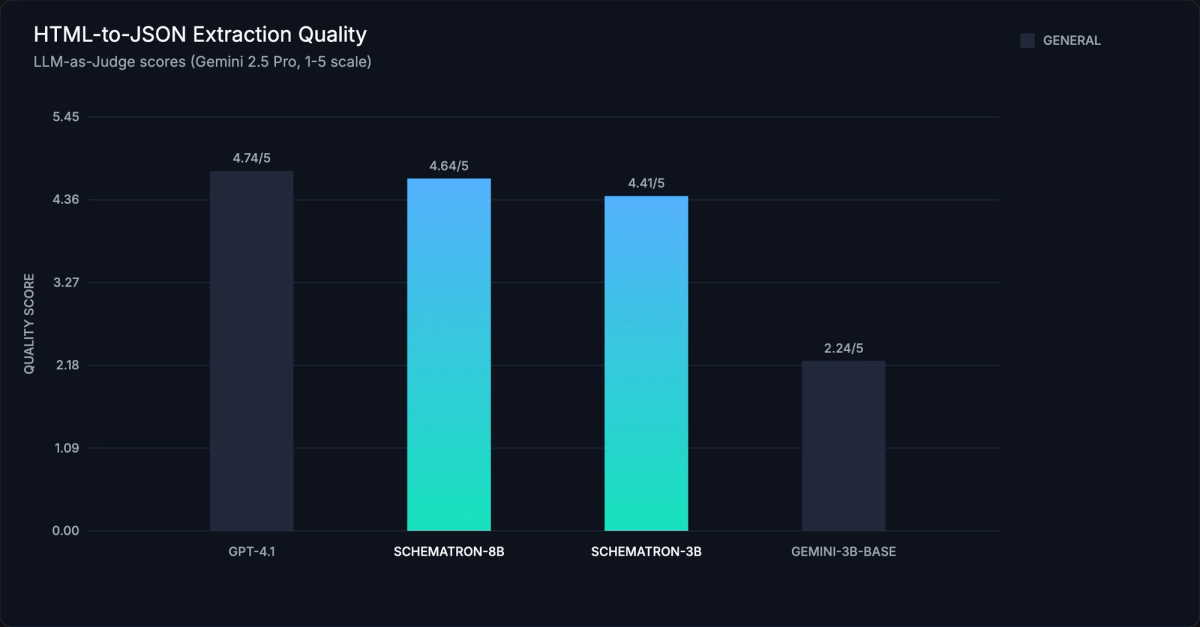
Crawl4AI itself is free and open source. The cost depends on the extraction model. CSS/Regex extraction costs nothing. For LLM-based extraction at scale, your model choice determines whether your pipeline costs $15 per thousand pages or $0.19.
Use Schematron-3B as your default. It handles the vast majority of extraction tasks. Switch to Schematron-8B for complex nested schemas or pages exceeding 10K tokens of relevant content.
The complete pipeline: Crawl → Clean → Extract → Validate
Here's the full production pipeline. Four steps, each with a clear job:
- Crawl with Crawl4AI — fetch the page, render JavaScript, get raw HTML
- Clean with lxml — strip scripts, styles, and noise (matches Schematron's training preprocessing)
- Extract with Schematron via the Inference.net API — HTML + schema in, JSON out
- Validate with Pydantic — type-check and enforce constraints on the output
import asyncio
import os
import json
from pydantic import BaseModel, Field
from openai import OpenAI
from crawl4ai import AsyncWebCrawler, BrowserConfig, CrawlerRunConfig, CacheMode
from lxml.html.clean import Cleaner
import lxml.html as LH


# ── Step 1: Define your extraction schema ────────────────────────────
# Pydantic models give you type safety and validation for free.
# Field descriptions help Schematron resolve ambiguous content.
class Product(BaseModel):
    name: str = Field(..., description="Product name or title")
    price: float = Field(..., description="Price in USD")
    currency: str = Field(default="USD", description="Currency code")
    description: str = Field(default="", description="Product description")
    specs: dict = Field(default_factory=dict, description="Technical specifications")
    in_stock: bool = Field(default=True, description="Whether the product is available")


# ── Step 2: Set up HTML cleaning ─────────────────────────────────────
# lxml's Cleaner strips scripts, styles, and inline JS — matching
# Schematron's training data preprocessing for best results.
HTML_CLEANER = Cleaner(
    scripts=True,
    javascript=True,
    style=True,
    inline_style=True,
    safe_attrs_only=False,
)


def clean_html(raw_html: str) -> str:
    """Remove scripts, styles, and noise from raw HTML."""
    if not raw_html or not raw_html.strip():
        return ""
    doc = LH.fromstring(raw_html)
    cleaned = HTML_CLEANER.clean_html(doc)
    return LH.tostring(cleaned, encoding="unicode")


# ── Step 3: Initialize the Schematron client ─────────────────────────
# Uses the OpenAI-compatible API at inference.net. Drop-in replacement
# for any code that already uses the OpenAI SDK.
schematron_client = OpenAI(
    base_url="https://api.inference.net/v1",
    api_key=os.environ["INFERENCE_API_KEY"],
)


async def crawl_and_extract(url: str) -> Product:
    """Full pipeline: crawl a URL and extract structured product data."""

    # ── Crawl ────────────────────────────────────────────────────────
    browser_config = BrowserConfig(headless=True, text_mode=True)
    run_config = CrawlerRunConfig(cache_mode=CacheMode.BYPASS)

    async with AsyncWebCrawler(config=browser_config) as crawler:
        result = await crawler.arun(url=url, config=run_config)
        if not result.success:
            raise RuntimeError(f"Crawl failed: {result.error_message}")

    # ── Clean ────────────────────────────────────────────────────────
    cleaned = clean_html(result.html)

    # ── Extract ──────────────────────────────────────────────────────
    # Schematron takes HTML + schema, returns strictly valid JSON.
    # Using .beta.chat.completions.parse() for automatic Pydantic parsing.
    response = schematron_client.beta.chat.completions.parse(
        model="inference-net/schematron-3b",
        messages=[{"role": "user", "content": cleaned}],
        response_format=Product,
    )

    # ── Validate ─────────────────────────────────────────────────────
    # The .parsed attribute is already a validated Pydantic object.
    product = response.choices[0].message.parsed
    return product


# Run the pipeline
if __name__ == "__main__":
    product = asyncio.run(crawl_and_extract("https://example.com/product/1"))
    print(json.dumps(product.model_dump(), indent=2))
The lxml cleaning step isn't optional. Schematron was trained on pre-cleaned HTML, and skipping it degrades extraction quality. The response_format=Product parameter constrains output to your Pydantic schema, so you get a validated object back directly with no extra parsing code.
We recommend this direct pipeline over wiring Schematron through Crawl4AI's LLMExtractionStrategy. Schematron expects HTML + schema directly, not the natural language instruction wrapper that LLMExtractionStrategy adds. The direct approach gives you full control over the input format.
Cost comparison: Schematron vs. general LLMs
At production scale, model choice is the dominant cost factor. Here's what extraction costs look like across models at 1,000 pages (assuming 10K input tokens + 8K output tokens per page):
| Model | Cost/1K Pages | Relative Cost | Speed | Quality Score |
|---|---|---|---|---|
| Schematron-3B | $0.19 | 0.5x | Fast | 4.41/5 |
| Schematron-8B | $0.38 | 1x (baseline) | Fast | 4.64/5 |
| Gemini 2.5 Flash | $1.90 | ~5x | Medium | N/A |
| GPT-4o | $7.50 | ~20x | Slow | N/A |
| GPT-4.1 | $11.40 | ~30x | Slow | 4.74/5 |
| GPT-5 | $15.20 | ~40x | Slow | N/A |
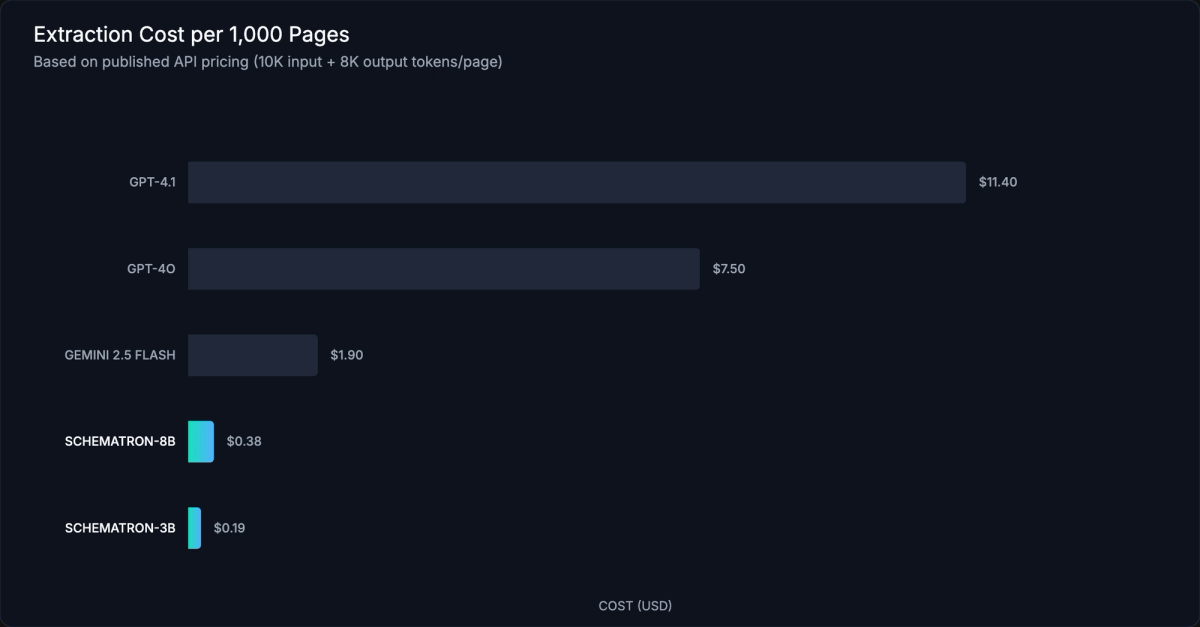
The numbers speak for themselves. Schematron-8B gets 98% of GPT-4.1's extraction quality at 1/30th the cost. Schematron-3B is 80x cheaper than GPT-5 with a quality score of 4.41, more than good enough for most structured data extraction tasks. Latency is roughly 10x lower than frontier models, so a backlog of 50,000 pages that takes days with GPT-4.1 finishes in hours with Schematron.
For pipelines running at scale, Inference.net also offers a Batch API that processes up to 50,000 jobs at once, and a Group API that bundles up to 50 requests per payload. New accounts get $10 in free credits, enough to extract roughly 25,000 pages with Schematron-3B.
Scaling up: multi-URL crawling
Single-page crawling is fine for development and testing. Production pipelines need to process hundreds or thousands of URLs concurrently. Crawl4AI's arun_many() method handles this natively with configurable concurrency.
import asyncio
import os
import json
from pydantic import BaseModel, Field
from openai import OpenAI
from crawl4ai import AsyncWebCrawler, BrowserConfig, CrawlerRunConfig, CacheMode
from lxml.html.clean import Cleaner
import lxml.html as LH


class Product(BaseModel):
    name: str = Field(..., description="Product name")
    price: float = Field(..., description="Price in USD")
    description: str = Field(default="", description="Product description")


HTML_CLEANER = Cleaner(
    scripts=True,
    javascript=True,
    style=True,
    inline_style=True,
    safe_attrs_only=False,
)


def clean_html(raw: str) -> str:
    doc = LH.fromstring(raw)
    return LH.tostring(HTML_CLEANER.clean_html(doc), encoding="unicode")


schematron = OpenAI(
    base_url="https://api.inference.net/v1",
    api_key=os.environ["INFERENCE_API_KEY"],
)


async def crawl_and_extract_batch(urls: list[str]) -> list[Product]:
    browser_config = BrowserConfig(headless=True, text_mode=True)
    run_config = CrawlerRunConfig(cache_mode=CacheMode.BYPASS)

    # Crawl all URLs concurrently with arun_many()
    async with AsyncWebCrawler(config=browser_config) as crawler:
        results = await crawler.arun_many(urls=urls, config=run_config)

    # Extract structured data from each successful crawl
    products = []
    for result in results:
        if not result.success:
            print(f"Skipped {result.url}: {result.error_message}")
            continue

        cleaned = clean_html(result.html)
        response = schematron.beta.chat.completions.parse(
            model="inference-net/schematron-3b",
            messages=[{"role": "user", "content": cleaned}],
            response_format=Product,
        )
        products.append(response.choices[0].message.parsed)

    return products


# Example: crawl 50 product pages
if __name__ == "__main__":
    urls = [f"https://example.com/product/{i}" for i in range(1, 51)]
    products = asyncio.run(crawl_and_extract_batch(urls))
    print(f"Extracted {len(products)} products")
For pipelines exceeding a few hundred pages, consider decoupling the crawl and extraction phases. Crawl all URLs first, store the HTML, then batch-extract with Schematron using the Inference.net Batch API. This gives you retry logic for each phase independently and keeps the browser pool from becoming a bottleneck during LLM calls.
arun_many() also supports streaming via config.stream=True, which yields results as they complete rather than waiting for the entire batch. Useful when you want to write extracted records to a database as they arrive instead of buffering everything in memory.
At higher volumes, think about the architecture of your pipeline. The crawl phase is I/O-bound (waiting for pages to render), while extraction is compute-bound (waiting for model inference). Running them as separate stages with a queue in between lets you tune concurrency for each independently. Crawl4AI's arun_many() handles crawl parallelism; for extraction parallelism, use Python's asyncio.gather() with the async OpenAI client, or submit to the Inference.net Batch API.
Advanced configuration
Crawl4AI has a large configuration surface. The basics get you 80% of the way, but production scrapers usually need to handle dynamic content, evade bot detection, or crawl entire site sections. Here's how.
Deep crawling and URL discovery
When you need to crawl an entire site or section, Crawl4AI offers three traversal strategies: BFS (breadth-first), DFS (depth-first), and Best-First (prioritized by a scoring function). Version 0.8.0 added crash recovery, so interrupted deep crawls resume from where they left off.
from crawl4ai import CrawlerRunConfig, CacheMode
from crawl4ai.deep_crawling import BFSDeepCrawlStrategy

# Configure a BFS deep crawl with a 100-page limit
deep_config = CrawlerRunConfig(
    deep_crawl_strategy=BFSDeepCrawlStrategy(
        max_depth=3,  # How many link levels to follow
        max_pages=100,  # Total page limit
        filter_links=lambda url: "/blog/" in url,  # Only follow blog URLs
    ),
    cache_mode=CacheMode.ENABLED,  # Cache pages during deep crawls
)
For URL discovery without extraction overhead, enable prefetch=True in your CrawlerRunConfig. Prefetch mode skips markdown conversion and extraction, making URL discovery 5-10x faster. Run a prefetch pass first to build your URL list, then crawl and extract only the pages you actually need.
Session management and authentication
Multi-step workflows (login, navigate to a dashboard, scrape data) require persistent browser sessions. Crawl4AI handles this through persistent contexts:
browser_config = BrowserConfig(
    headless=True,
    use_persistent_context=True,
    user_data_dir="./browser_sessions/my_session",
)
For pages that need JavaScript interaction before content is visible, use js_code to execute scripts and wait_for to pause until a selector appears:
run_config = CrawlerRunConfig(
    js_code="document.querySelector('#load-more').click()",
    wait_for="css:.results-loaded",  # Wait for this CSS selector
    page_timeout=30000,  # 30-second timeout
)
Crawl4AI also exposes 8 hook points (on_page_context_created, before_goto, after_goto, and more) for injecting custom logic at every stage of the crawl pipeline. Use hooks for setting cookies, modifying headers, or logging request data.
Proxy and stealth mode
Bot detection is an arms race. Crawl4AI ships with several evasion tools. Enable enable_stealth for Playwright-stealth integration, which patches browser fingerprints to avoid detection by Cloudflare, Akamai, and similar services.
browser_config = BrowserConfig(
    headless=True,
    enable_stealth=True,               # Playwright-stealth patches
    user_agent_mode="random",           # Rotate user agents
    proxy_config={
        "server": "http://proxy.example.com:8080",
        "username": "user",
        "password": "pass",
    },
)
For rotating proxies, Crawl4AI supports proxy rotation strategies at the CrawlerRunConfig level, so each request can use a different proxy from your pool.
MCP server integration
Crawl4AI works as an MCP (Model Context Protocol) server, which means AI agents like Claude can call it directly to crawl the web. If you're building AI agent workflows, this is how you bridge your agent's reasoning with live web data. The MCP server exposes crawling as a tool that agents call with a URL and get structured content back. The community has also built integrations with automation platforms like n8n for no-code scraping workflows. Configuration details are in the Crawl4AI docs.
Crawl4AI vs. alternatives
Crawl4AI isn't the only option for web scraping. The right tool depends on your needs around JavaScript rendering, LLM integration, hosting control, and pipeline complexity. Here's how the major options compare:
| Feature | Crawl4AI | Firecrawl | Scrapy | BeautifulSoup | ScrapeGraph-AI |
|---|---|---|---|---|---|
| License | Apache-2.0 | Proprietary (SaaS) | BSD-3 | MIT | MIT |
| Self-Hostable | Yes | Limited | Yes | N/A (library) | Yes |
| JS Rendering | Yes (Playwright) | Yes | No (needs Splash) | No | Yes |
| LLM Extraction | Yes (LiteLLM) | Yes (built-in) | No | No | Yes (graph logic) |
| Async Support | Yes | API-only | Yes (Twisted) | No | No |
| Markdown Output | Yes | Yes | No | No | No |
| Deep Crawl | Yes (BFS/DFS) | Limited | Yes | No | No |
| Stealth Mode | Yes | Yes | No | N/A | No |
| MCP Server | Yes | No | No | No | No |
| Open Source | Yes | No | Yes | Yes | Yes |
| Best For | LLM pipelines, full control | Managed scraping | High-volume traditional | Simple HTML parsing | LLM graph pipelines |
Pick Crawl4AI when you need an open-source, self-hosted solution with native LLM integration and Markdown output. You get full control over the browser, extraction strategy, and output format, which matters for production AI pipelines where you need to own the whole stack.
Firecrawl is simpler if you want managed infrastructure and don't need self-hosting. It handles the browser fleet, scaling, and anti-bot measures for you, but you're paying per-page prices and routing your crawl traffic through a third party. Scrapy is still the best option for high-volume traditional scraping where you don't need JavaScript rendering or LLM extraction. It's proven at massive scale but requires Splash or Playwright integration for modern JS-heavy sites. BeautifulSoup is a parsing library, not a crawler; use it for simple HTML parsing tasks, not full scraping pipelines. ScrapeGraph-AI is worth a look if you want graph-based LLM extraction logic, but it lacks Crawl4AI's async performance and deep crawl capabilities.
Troubleshooting and common issues
Even well-configured scrapers hit edge cases. Here are the problems I see most often and how to fix them.
Playwright browser not found after install. This usually happens when crawl4ai-setup fails silently. Fix it manually: python -m playwright install --with-deps chromium. The --with-deps flag installs system-level dependencies that Chromium needs.
Timeouts on dynamic pages. If pages load content via JavaScript after the initial render, the default timeout won't be enough. Increase page_timeout in your CrawlerRunConfig and use wait_for with a CSS selector that only appears after the dynamic content loads: wait_for="css:.content-loaded". For infinite-scroll pages, set scan_full_page=True to auto-scroll before extraction.
Bot detection and Cloudflare blocks. Enable stealth mode (enable_stealth=True in BrowserConfig), randomize user agents (user_agent_mode="random"), and configure proxy rotation. For stubborn sites, persistent browser contexts with realistic browsing patterns work better than fresh instances.
Empty extraction results. Three things to check. First, lower the word_count_threshold. The default of 200 is aggressive and may filter out content blocks you need. Second, switch from raw_markdown to fit_markdown (or vice versa) to see if content filtering is the issue. Third, for CSS/XPath extraction, verify your selectors against the live DOM using your browser's dev tools.
Memory issues on large crawls. Enable text_mode=True in BrowserConfig to skip image loading, and set light_mode=True to disable background browser features. For crawls exceeding a few hundred pages, process URLs in batches rather than loading everything into memory at once. The Docker deployment with --shm-size=1g also helps prevent memory-related crashes in the Chromium process.
LLM extraction returns malformed JSON. When using LLMExtractionStrategy with general-purpose models, extraction failures often come from the model adding explanation text around the JSON. Set temperature=0 in extra_args and use extraction_type="schema" with a Pydantic model to constrain the output format. If you're still seeing issues, switch to Schematron. It's trained to output only valid JSON with zero narration.
Wrapping up
Crawl4AI handles the hard parts of web crawling: JavaScript rendering, content cleaning, dynamic page interaction, bot evasion. It gives you clean, LLM-ready output. Pair it with a specialized extraction model like Schematron, and you have a complete pipeline that converts any web page into validated, typed JSON at production scale.
The strategy is simple. Use CSS or Regex extraction when page structures are consistent. Use Schematron-3B for schema-based LLM extraction where you need structured output from varied pages. It gets close to GPT-4.1 quality at 1/80th the cost. Save Schematron-8B for complex schemas or unusually long pages.
Get started with $10 free credits on Inference.net to run Schematron in your Crawl4AI pipeline. For deeper dives into specific features, the Crawl4AI documentation and the Inference.net API docs are your next stops.
Meet with our research team
Schedule a call with our research team to learn more Specialized Language Models can cut costs and improve performance.